---
title: Generalized Linear Model (GLM)
description: Run generalized linear models including logistic regression, Poisson regression, and Gamma regression using the GLM tab. View coefficients, model fit statistics, diagnostic plots, and predictions.
priority: 0.7
---
# Generalized Linear Model (GLM) {#generalized-linear-model-glm}
The GLM tab performs regression analysis using generalized linear models. A GLM is defined by a distribution family, a linear predictor $\eta = X\beta + \text{offset}$, and a link function $g(\mu) = \eta$, extending OLS to the exponential family of distributions. The offset term defaults to zero when not specified. See [GLM Fundamentals](concepts-glm) for the mathematical background.
OLS regression in the Linear Regression tab is a special case of GLM (Gaussian family with identity link). See [Linear Regression](linear-regression) for details on OLS.
## Distribution Families and Link Functions {#distribution-families-and-link-functions}
The distribution families and link functions available in MIDAS are listed below.
### Choosing a Distribution Family {#choosing-a-distribution-family}
| Family | UI Label | Variance Function $V(\mu)$ | Use Case |
|--------|----------|----------------------|----------|
| Gaussian | Gaussian (Normal) | $1$ | Continuous response variable. Equivalent to standard linear regression |
| Binomial | Binomial (Logistic) | $\mu(1 - \mu)$ | Binary data (0/1) or proportion data. Logistic regression |
| Poisson | Poisson (Count) | $\mu$ | Count data (event occurrences). Assumes variance equals the mean |
| Gamma | Gamma (Positive Continuous) | $\mu^2$ | Positive continuous values with right-skewed distributions (wait times, costs) |
| Negative Binomial | Negative Binomial (Overdispersed Count) | $\mu + \mu^2/\theta$ | Overdispersed count data. Use when the Poisson equidispersion assumption $\operatorname{Var}(Y) = \mu$ does not hold |
The choice of family is driven by the nature of the response variable. Binary outcomes call for Binomial, non-negative integers for Poisson (or Negative Binomial if overdispersed), and positive continuous values with a roughly constant coefficient of variation (variance proportional to the square of the mean) for Gamma.
The Binomial family supports both individual 0/1 data (Binary) and aggregated successes/trials data (Grouped). See [Grouped Binomial GLM with Dose-Response Data](glm-grouped-binomial) for details.
### Link Functions {#link-functions}
The link function is a monotonic function $\eta = g(\mu)$ connecting the linear predictor to the expected value of the response. Except for Negative Binomial, each family's default link is its canonical link. The canonical link for Negative Binomial is $\log(\mu/(\mu+\theta))$, but when $\theta$ is estimated the link function changes at each iteration, making estimation unstable. Log is used as the default in practice.
| Family | Default Link | Available Links |
|--------|-------------|-----------------|
| Gaussian | Identity | Identity, Log |
| Binomial | Logit | Logit, Probit |
| Poisson | Log | Log, Identity |
| Gamma | Inverse | Inverse, Log, Identity |
| Negative Binomial | Log | Log |
| Link Function | Formula | Description |
|--------------|---------|-------------|
| Identity | $\eta = \mu$ | No transformation. Canonical link for Gaussian |
| Logit | $\eta = \log\!\bigl(\mu / (1 - \mu)\bigr)$ | Log-odds transformation. Canonical link for Binomial |
| Log | $\eta = \log(\mu)$ | Log transformation. Canonical link for Poisson. Ensures $\mu > 0$ |
| Inverse | $\eta = 1/\mu$ | Reciprocal transformation. Canonical link for Gamma |
| Probit | $\eta = \Phi^{-1}(\mu)$ | Inverse CDF of the standard normal distribution. Corresponds to a latent normal variable model |
The canonical link provides stable maximum likelihood estimation. Non-canonical links may be chosen for easier coefficient interpretation but can lead to convergence issues. See [GLM Fundamentals](concepts-glm#link-functions) for the mathematical properties of canonical links.
## Basic Usage {#basic-usage}
The examples below use the Auto MPG dataset.
### Opening GLM {#opening-glm}
Select **Analysis > Generalized Linear Model (GLM)...** from the menu bar.
### Setting Up Variables {#setting-up-variables}
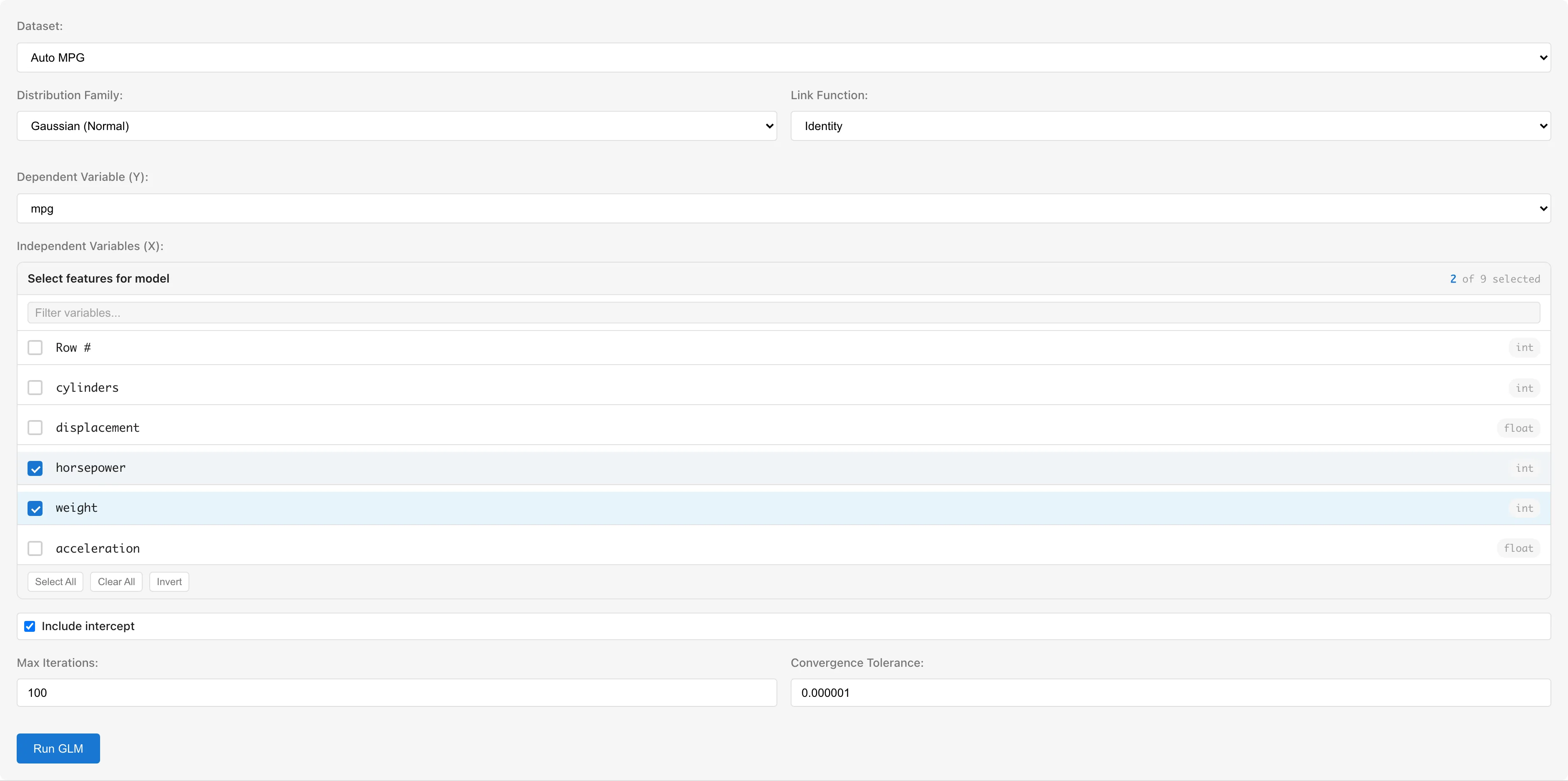
**Dataset** selects the dataset to analyze.
**Response Variable (Y)** selects the response variable. Numeric columns (int64, float64) and boolean columns are available. Boolean values are automatically converted to true=1, false=0. For the Binomial family, use a 0/1 or boolean column.
**Predictor Variables (X)** selects predictor variables using checkboxes. Columns with categorical scales (nominal/ordinal) or date/datetime types are not selectable. To use categorical variables, convert them to numeric dummy variables using the **Dummy Coding** tab first (see [Notes](#using-categorical-variables)).
**Distribution Family** selects the distribution family. Changing the family automatically switches the link function to the canonical link for that family.
**Link Function** selects the link function. Available options depend on the selected family.
**Include intercept** toggles the intercept term. Enabled by default.
### Negative Binomial Settings {#negative-binomial-settings}
When the Negative Binomial family is selected, options for the shape parameter $\theta$ appear. The Negative Binomial variance is $\operatorname{Var}(Y) = \mu + \mu^2/\theta$ (the NB2 parameterization), where $\theta$ controls the degree of overdispersion.
- **Automatic (default)**: $\theta$ is estimated using profile likelihood. An outer loop optimizes $\theta$ while an inner IRLS loop estimates $\beta$
- **Manual**: Check **Manually specify θ** and enter a value (0.1 to 100, default 1.0). Useful for sensitivity analysis or model comparison
Interpreting $\theta$:
- $\theta \to \infty$: Converges to Poisson ($\operatorname{Var}(Y) \to \mu$)
- $\theta \approx 10\text{--}100$: Moderate overdispersion
- $\theta \approx 1\text{--}10$: Strong overdispersion
- $\theta < 1$: Extreme overdispersion
### Offset Variable {#offset-variable}
**Offset Variable** adds a known quantity to the linear predictor with a fixed coefficient of 1. The offset is not estimated from data; it is a fixed value for each observation.
A typical use case is rate modeling in Poisson regression. Set the count as the response variable and $\log(\text{exposure})$ as the offset to model rates instead of counts:
$$\eta_i = X_i\beta + \log(\text{exposure}_i)$$
This parameterization means that $\exp(\beta)$ is interpretable as a rate ratio.
Setting an offset also affects the null deviance. The null model becomes intercept + offset, so the null deviance differs from the case without an offset.
When predicting with a saved model that includes an offset, the prediction dataset must contain an offset column with the same name. The linear predictor for prediction is $\hat\eta_i = X_i\hat\beta + \text{offset}_i$.
### Advanced Options {#advanced-options}
- **Max Iterations**: Maximum number of IRLS iterations (default: 100)
- **Convergence Tolerance**: Convergence threshold based on maximum absolute change in coefficients (default: 1e-6)
### Running the Analysis {#running-the-analysis}
Click the **Run GLM** button.
Parameter estimation uses IRLS (Iteratively Reweighted Least Squares; see [algorithm details](concepts-glm#parameter-estimation-irls)). The progress dialog shows the deviance at each iteration. Click **Cancel** to stop the analysis, and use **Save as Dataset** to save the convergence history.
## Understanding Results {#understanding-results}
### Model Summary {#model-summary}
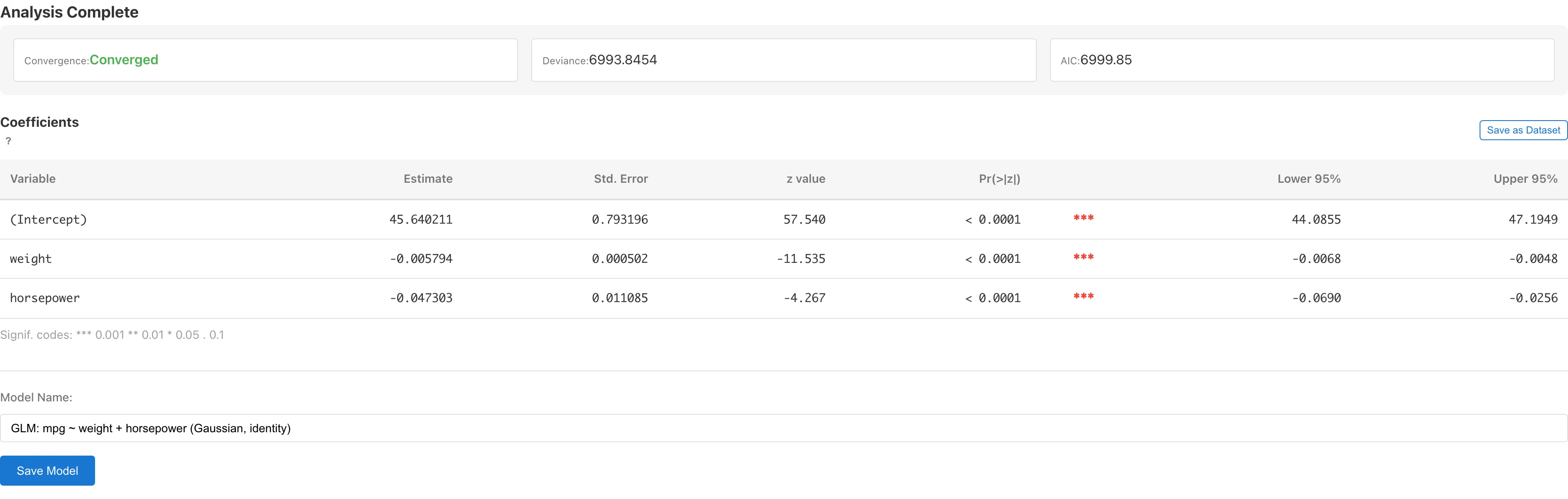
| Metric | Description |
|--------|-------------|
| Convergence | Whether IRLS converged (with iteration count) |
| Deviance | Residual deviance $D = 2\bigl[\ell(y;\,y) - \ell(y;\,\hat\mu)\bigr]$. A goodness-of-fit measure based on the log-likelihood difference from the saturated model |
| AIC | Akaike Information Criterion $\text{AIC} = -2\ell + 2k$, where $k$ is the total number of estimated parameters. Used for comparing models within the same family. Comparing AIC across different families is not recommended because the constant terms in the log-likelihood differ. Lower values indicate better fit-complexity trade-off |
| Shape Parameter ($\theta$) | Negative Binomial only. $\theta$ controls the degree of overdispersion: smaller values indicate stronger overdispersion, while $\theta \to \infty$ converges to Poisson (see [Negative Binomial Settings](#negative-binomial-settings)). Indicates whether $\theta$ was estimated or manually specified |
$k$ in the AIC formula is the total number of estimated parameters. For Poisson and Binomial, $k$ is the number of regression coefficients (including the intercept); for Gaussian and Gamma, it is the number of regression coefficients plus the dispersion parameter (Gaussian: $\sigma^2$, Gamma: $\phi$). For Negative Binomial, $\theta$ is included in $k$ only when it is automatically estimated. A manually specified $\theta$ is not an estimated parameter and is not counted. Be aware of this difference when comparing AIC between $\theta$-estimated and $\theta$-fixed models.
### Coefficients {#coefficients}
| Column | Description |
|--------|-------------|
| Variable | Variable name (intercept shown as "(Intercept)") |
| Estimate | Estimated regression coefficient $\hat\beta$ (on link function scale) |
| Std. Error | Wald standard error $\sqrt{\hat\phi \cdot \operatorname{diag}\bigl((X'\hat WX)^{-1}\bigr)}$. $\hat\phi$ is the dispersion parameter ($\hat\phi = 1$ for Poisson, Binomial, and Negative Binomial with estimated $\theta$) |
| Lower N% / Upper N% | Confidence interval $\hat\beta \pm c \times \operatorname{SE}(\hat\beta)$, where N is the selected confidence level. $c$ is $t_{1-\alpha/2,\, n-p}$ for dispersion-estimating families, or $z_{1-\alpha/2}$ for others (e.g., $z_{0.975} = 1.96$ at the 95% level) |
| OR / IRR / exp(Est.) | $\exp(\hat\beta)$. Displayed as odds ratio (OR) for logit link, incidence rate ratio (IRR) for Poisson and Negative Binomial with log link, or multiplicative effect exp(Est.) for Gamma and Gaussian with log link. Not shown for identity, inverse, or probit links |
| exp(Lower N%) / exp(Upper N%) | $\exp(\text{Lower } N\%)$ and $\exp(\text{Upper } N\%)$. The link-scale confidence interval transformed to the response scale. Shown under the same conditions as the OR / IRR column |
For Negative Binomial with estimated $\theta$, $\phi = 1$ because the overdispersion is already modeled by the $\mu^2/\theta$ term in the variance function — there is no remaining overdispersion for $\phi$ to absorb, so standard errors are computed with $\phi = 1$. When $\theta$ is manually fixed, the specified value may not fully capture the data's overdispersion, so $\hat\phi = \text{Pearson }\chi^2/(n-p)$ is estimated instead.
### Interpreting Coefficients {#interpreting-coefficients}
Coefficients are estimated on the link function scale, so interpretation requires considering the inverse link function.
- **Identity link**: $\beta$ is the change in $E[Y]$ per unit change in $X$ (same as OLS)
- **Logit link**: $\beta$ is the change in log-odds. $\exp(\beta)$ is the odds ratio
- **Log link**: $\beta$ is the change in $\log(\mu)$. $\exp(\beta)$ is the multiplicative change in $E[Y]$
- **Inverse / Probit link**: Direct interpretation is difficult; interpretation through predicted values is more practical
The coefficients table can be saved as a dataset using the **Save as Dataset** button for export to CSV. You must save the model first (using the **Save Model** button). Linking the coefficient dataset to a specific model means that deleting the model also deletes the derived coefficient dataset and any report element that references it, and refitting the model updates the dataset contents to reflect the new fit.
The saved dataset contains Variable, Estimate, Std. Error, Lower N%, and Upper N%. For logit and log links, the exp-transformed columns are also included: OR / IRR / exp(Est.), exp(Lower N%), and exp(Upper N%).
## Saving and Diagnostics {#saving-and-diagnostics}
### Saving the Model {#saving-the-model}
Enter a model name in the **Model Name** field and click **Save Model**. The model name defaults to the format "GLM: Y ~ X1 + X2 (Family, link)".
If an existing model with the same configuration (dataset, response variable, predictor variables, family, link function, intercept inclusion) exists, a confirmation dialog for overwriting is displayed.
### Data Generated for Diagnostics {#data-generated-on-save}
After saving the model, opening the GLM Diagnostics tab for the first time via **View Diagnostics** creates a derived dataset that adds diagnostic columns to the original data.
| Column | Symbol | Description |
|--------|--------|-------------|
| `fitted_values` | $\hat\mu_i = g^{-1}(x_i'\hat\beta)$ | Predicted values (on the response scale) |
| `deviance_residuals` | $d_i$ | Deviance residuals |
| `pearson_residuals` | $r_i = (y_i - \hat\mu_i) / \sqrt{V(\hat\mu_i) / w_i}$ | Pearson residuals. $w_i$ is the prior weight ($w_i = 1$ for binary data) |
| `standardized_residuals` | $r_i^* = d_i / \sqrt{\phi(1 - h_i)}$ | Standardized residuals (deviance-based) |
| `sqrt_abs_std_residuals` | $\sqrt{\lvert r_i^* \rvert}$ | Square root of the absolute standardized residuals. The vertical axis of the Scale-Location plot |
| `standardized_pearson_residuals` | $r_i / \sqrt{\phi(1 - h_i)}$ | Standardized residuals (Pearson-based) |
| `sqrt_abs_std_pearson_residuals` | | Square root of the absolute Pearson-based standardized residuals |
| `cooks_distance_pearson` | | Cook's Distance computed from Pearson-based standardized residuals |
| `leverage` | $h_i$ | Leverage (diagonal of the hat matrix) |
| `cooks_distance` | $D_i$ | Cook's Distance |
The Pearson-based columns correspond to the diagnostic plots when **Pearson** is selected as the [residual type](#residual-type-selection).
The $\phi$ used for computing standardized residuals and Cook's Distance differs by family. For Poisson, Binomial, and Negative Binomial, $\phi = 1$: the variance function $V(\mu)$ specifies the theoretical variance, so overdispersion is not absorbed into the diagnostic statistics. For Negative Binomial, $\phi = 1$ regardless of whether $\theta$ is estimated or fixed. For Gaussian, $\phi = \text{Deviance}/(n - p)$; for Gamma, $\phi = \text{Pearson }\chi^2/(n-p)$. Note that for Negative Binomial with fixed $\theta$, this differs from the $\hat\phi = \text{Pearson }\chi^2/(n-p)$ used for standard errors in the [coefficients table](#coefficients).
### Diagnostics and Details {#diagnostics-and-details}
After saving the model, two buttons appear:
- **View Model Details** - Opens the Model Detail tab showing detailed model information. Changing the **Confidence Level** input recomputes the Wald confidence intervals and column headers in place from the saved coefficients and standard errors (the saved value is not modified). Use the **Add to Report** button to add the coefficients table to a report.
- **View Diagnostics** - Opens the GLM Diagnostics tab showing diagnostic plots
## Diagnostic Plots {#diagnostic-plots}
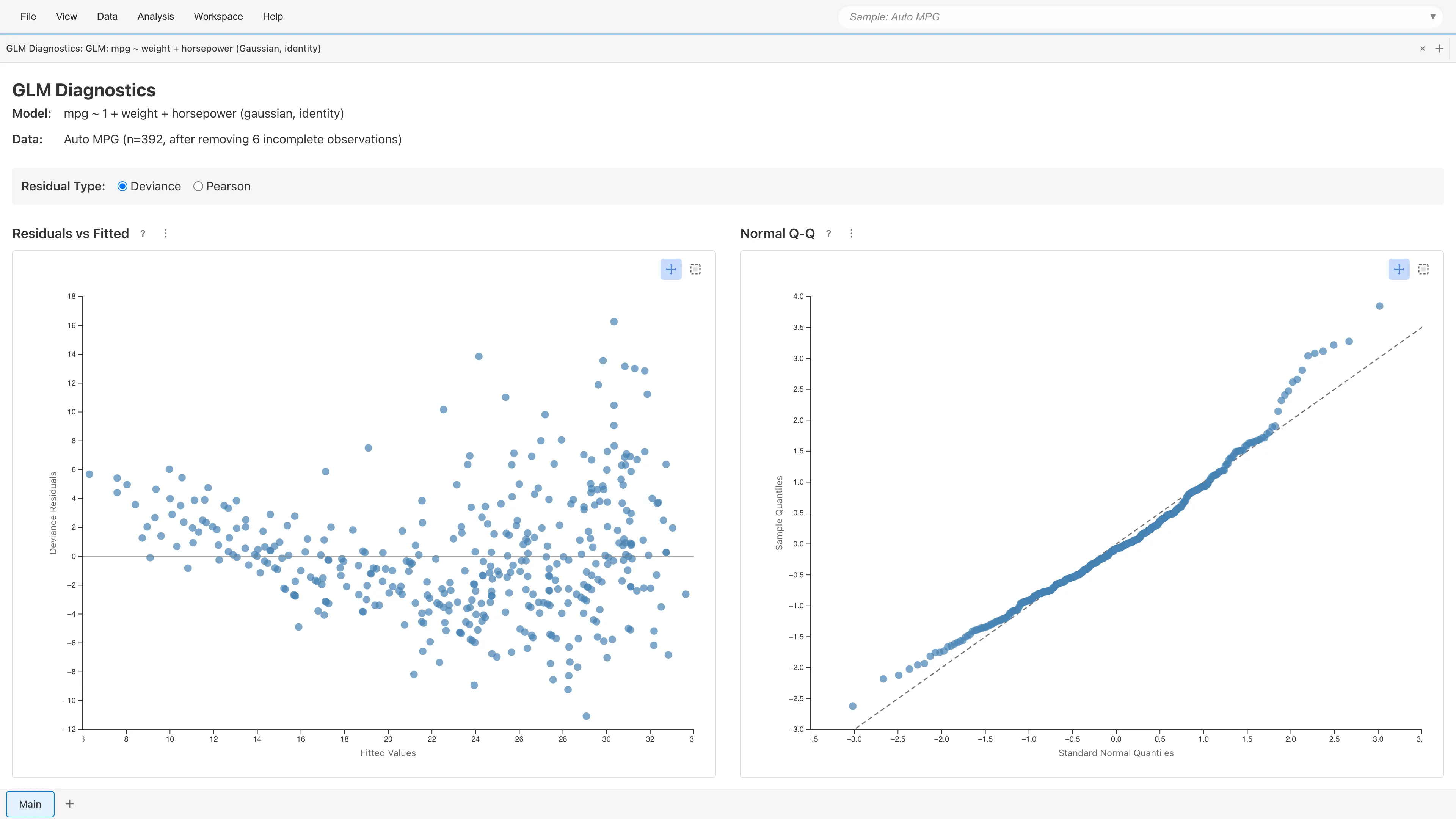
Clicking **View Diagnostics** displays four diagnostic plots. As with OLS, check linearity, constant variance, and outlier influence.
### Residual Type Selection {#residual-type-selection}
Select the residual type: **Deviance** (default) or **Pearson**. Switching updates all four plots immediately.
- **Deviance Residuals**: $d_i = \operatorname{sign}(y_i - \hat\mu_i) \times \sqrt{2\bigl[\ell(y_i;\,y_i) - \ell(y_i;\,\hat\mu_i)\bigr]}$, where $\ell(y_i; y_i)$ is the log-likelihood under the saturated model ($\mu_i = y_i$). Likelihood-based residuals and the default in MIDAS
- **Pearson Residuals**: $r_i = (y_i - \hat\mu_i) / \sqrt{V(\hat\mu_i) / w_i}$. $w_i$ is the prior weight ($w_i = 1$ for binary data; $w_i$ is the number of trials for grouped Binomial). Observed-minus-expected scaled by the variance function. Useful for diagnosing overdispersion, as Pearson $\chi^2 = \sum r_i^2$ is used to estimate the dispersion parameter $\phi$
### Residuals vs Fitted {#residuals-vs-fitted}
Plots residuals against fitted values $\hat\mu$. Random scatter around zero indicates adequate model fit.
- **Curved pattern**: The link function may be inappropriate, or nonlinear effects of predictors may be missing
- **Funnel-shaped pattern**: The variance function may be inappropriate (e.g., Poisson's $\operatorname{Var} = \mu$ does not match the data)
### Normal Q-Q Plot {#normal-q-q-plot}
**Shown only for Gaussian family.** Plots standardized residual quantiles against theoretical normal quantiles.
For non-Gaussian families, deviance residuals are not guaranteed to be asymptotically normal (particularly for binary Binomial data). Instead of the plot, the message "This plot is only shown for Gaussian family GLMs." is displayed.
### Scale-Location {#scale-location}
Plots $\sqrt{|\text{standardized residuals}|}$ against fitted values. Constant variance is indicated by points spreading evenly in the horizontal direction.
An upward trend suggests variance depends on fitted values. Since GLM explicitly models the mean-variance relationship through the variance function $V(\mu)$, patterns in this plot suggest the chosen family's variance function does not match the data well.
### Residuals vs Leverage {#residuals-vs-leverage}
Plots standardized residuals against leverage $h_i = \operatorname{diag}(H)_i$ (diagonal elements of the hat matrix). [Cook's (1977)](#ref-cook-1977) distance contours are displayed at $D = 0.5$ (orange dashed) and $D = 1.0$ (red dashed).
- **Leverage**: Measures how far an observation's predictor values are from others. $h_i > 2p/n$ ($p$ = number of parameters including the intercept, $n$ = number of observations) indicates high leverage
- **Cook's Distance**: $D_i = \dfrac{r_i^{*2}}{p} \cdot \dfrac{h_i}{1 - h_i}$. $D_i > 0.5$ warrants attention; $D_i > 1.0$ indicates strong influence
Observations outside the contour lines may substantially change the model estimates if removed.
### Point Selection {#point-selection}
Click or rectangle-select data points on any plot to display details (fitted values, residuals, leverage, Cook's Distance, etc.) in a table below the plots. Selection state is synchronized across all four plots.
### Deviance Goodness-of-Fit {#deviance-goodness-of-fit}
For Poisson and Binomial families, MIDAS displays the Deviance/df ratio (residual deviance divided by residual degrees of freedom). A ratio near 1 indicates that the observed variability is consistent with what the model expects. A ratio far from 1 suggests overdispersion (or underdispersion).
A Deviance/df ratio much greater than 1 suggests the model does not adequately capture the variability in the data. Consider whether important predictors are missing or whether the distributional assumption is appropriate. For Poisson data, switching to the Negative Binomial family may help. A ratio much less than 1 suggests underdispersion, which may indicate model misspecification. See [GLM Fundamentals](concepts-glm#variance-functions-and-overdispersion) for the theoretical background.
For Binomial models with binary response data (trial size = 1), the Deviance/df ratio is not a reliable indicator of model fit. Use the diagnostic plots to assess the model in that case.
## Prediction {#prediction}
Use a saved GLM model to generate predictions on new data.
### Running Predictions {#running-predictions}
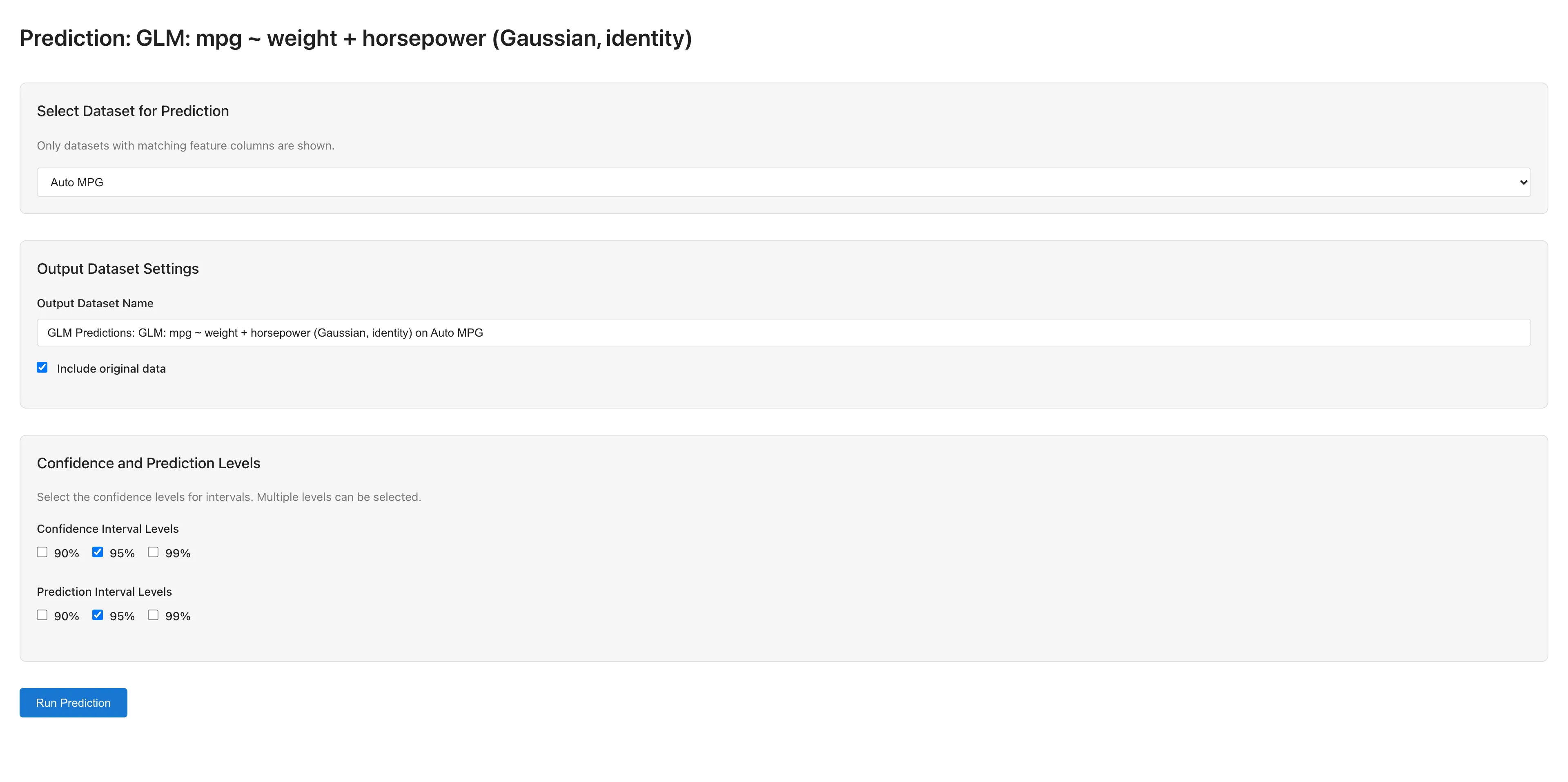
1. Open the Model Detail tab via **View Model Details**
2. Click the **Make Predictions** button to open the GLM Prediction tab
3. Select a dataset for prediction (only datasets with matching predictor column names are available)
4. Configure output settings:
- **Output Dataset Name**: Name for the prediction results dataset
- **Include original data**: Whether to include original columns in the output
- **Confidence Interval Levels**: Confidence interval levels (90%, 95%, 99%)
- **Prediction Interval Levels**: Prediction interval levels (90%, 95%, 99%)
5. Click **Run Prediction** to execute
### Prediction Output {#prediction-output}
Prediction results are saved as a dataset containing:
- Predicted values $\hat\mu = g^{-1}(X\hat\beta)$ (on the response scale)
- Confidence intervals for the mean response $E[Y \mid X]$, which capture the uncertainty in estimating the population mean at a given set of predictor values
- Prediction intervals for a new observation $Y_\text{new}$, which capture the uncertainty in a single future value including observation-level variability
### Reference Distribution for Intervals {#reference-distribution}
For families that estimate the dispersion parameter $\phi$ from data (Gaussian with any link, Gamma, Negative Binomial with fixed $\theta$), confidence and prediction intervals use the $t$ distribution with $n - p$ degrees of freedom, where $n$ is the number of training observations and $p$ is the total number of estimated parameters including the intercept. For Gaussian with identity link, this is the exact finite-sample result under the assumption that the errors are normally distributed. For other dispersion-estimating families, the $t$-distribution accounts for the additional uncertainty from estimating $\phi$.
For families with known dispersion ($\phi = 1$: Poisson, Binomial, Negative Binomial with estimated $\theta$), intervals use the standard normal ($z$) distribution as the reference. This is an asymptotic approximation that becomes more accurate as the sample size increases.
### Prediction Interval Methods {#prediction-interval-methods}
Prediction interval computation depends on the family. Gaussian with identity link uses an analytical formula that includes estimation uncertainty, while other combinations use plug-in methods. Plug-in methods do not account for parameter estimation uncertainty, so coverage probability may fall below the stated confidence level in small samples or for extrapolation points. See [GLM Fundamentals](concepts-glm#prediction-intervals) for the formulas.
When the prediction dataset contains the response variable, accuracy metrics (R², RMSE, MAE) are automatically calculated and displayed.
## Notes {#notes}
### Using Categorical Variables {#using-categorical-variables}
GLM only accepts numeric variables. To use categorical (nominal/ordinal) or date/datetime variables as predictors, convert them to numeric dummy variables using the [Dummy Coding](dummy-coding) tab before running the analysis.
### Automatic Exclusion of Missing and Invalid Values {#automatic-exclusion-of-missing-and-invalid-values}
Rows containing missing values (null), non-numeric values, or infinity are automatically excluded from the analysis. The number of excluded rows is displayed in the Data field of the GLM Diagnostics tab, opened via **View Diagnostics**, in the form "after removing N incomplete observations". This is listwise deletion. See [Missing Data Mechanisms](concepts-missing-data#listwise-deletion-and-mcar) for conditions under which it yields valid estimates.
### Convergence Issues {#convergence-issues}
If IRLS fails to converge or the results include an error or a numerical warning, check the following:
- **Iteration count**: Increase **Max Iterations** (e.g., 100 → 500)
- **Tolerance**: Relax **Convergence Tolerance** (e.g., 1e-6 → 1e-4)
- **Scaling**: Large differences in predictor scales can cause numerical instability. Consider standardizing
- **Condition number warning**: When the estimated condition number exceeds $10^{10}$, MIDAS displays a warning that the design matrix is ill-conditioned. Strong correlation among predictors or large differences in their scales are common causes. See [Condition Number](concepts-numerical#condition-number) for what it means and how to address it
- **Out-of-range fitted means**: With a link such as identity for Poisson or Gamma, the fitted mean can fall outside the valid range. Rather than clamp the mean into range, MIDAS stops the fit and reports an error, because clamping would make the deviance, AIC, residuals, standard errors, and confidence intervals describe a different fit from the coefficients. Choose a link that keeps the fitted mean in range, such as log
- **Perfect separation**: In logistic regression, when a predictor perfectly separates the response classes, the maximum likelihood estimate does not converge to a finite value ([Albert & Anderson, 1984](#ref-albert-anderson-1984)). MIDAS displays a warning when it detects separation. Remove the offending predictor or verify the data
- **Excess zeros**: When count data contains an extreme number of zeros, Poisson or Negative Binomial models may struggle to fit adequately
## References {#references}
- Nelder, J. A., & Wedderburn, R. W. M. (1972). Generalized linear models. *Journal of the Royal Statistical Society: Series A*, 135(3), 370-384. https://www.jstor.org/stable/2344614
- Cook, R. D. (1977). Detection of influential observation in linear regression. *Technometrics*, 19(1), 15-18. https://www.jstor.org/stable/1268249
- Albert, A., & Anderson, J. A. (1984). On the existence of maximum likelihood estimates in logistic regression models. *Biometrika*, 71(1), 1-10. https://www.jstor.org/stable/2336390