The Convert Column Types Tab
The Convert Column Types tab allows you to convert column data types. Use this when converting strings to numbers or changing date formats.
Basic Usage
Opening the Type Conversion Tab
- Open the Data Table tab
- Right-click a column header
- Select Convert Column Types...
Configuring Conversion
- Select the target data type in the To column dropdown
- Select error handling in On Error
- Click Preview to review the conversion result
- Click Apply to execute the conversion
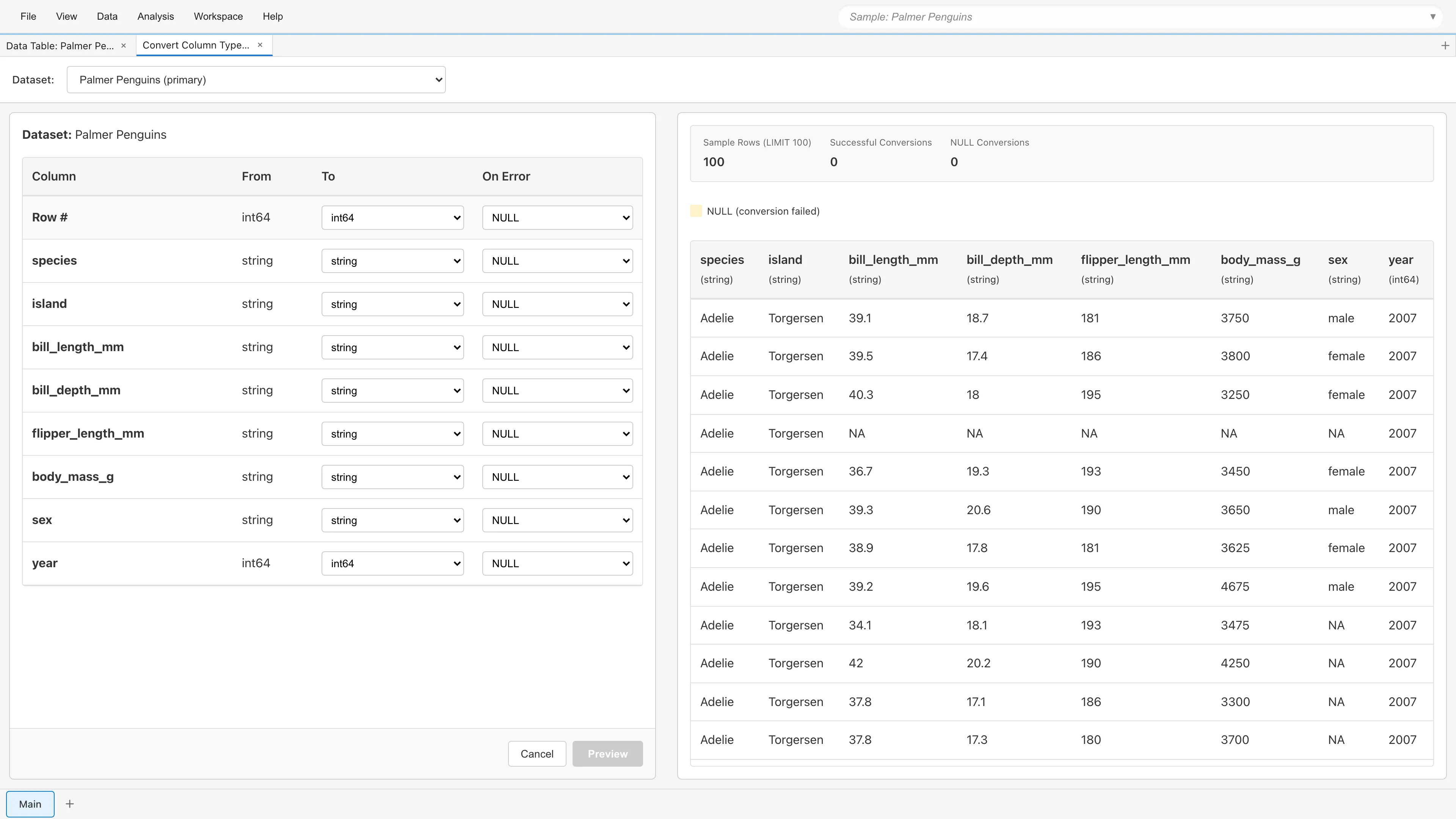
In this example, the bill_length_mm column is being converted from string to float64. The preview table on the right shows the conversion results.
Auto-detecting Types
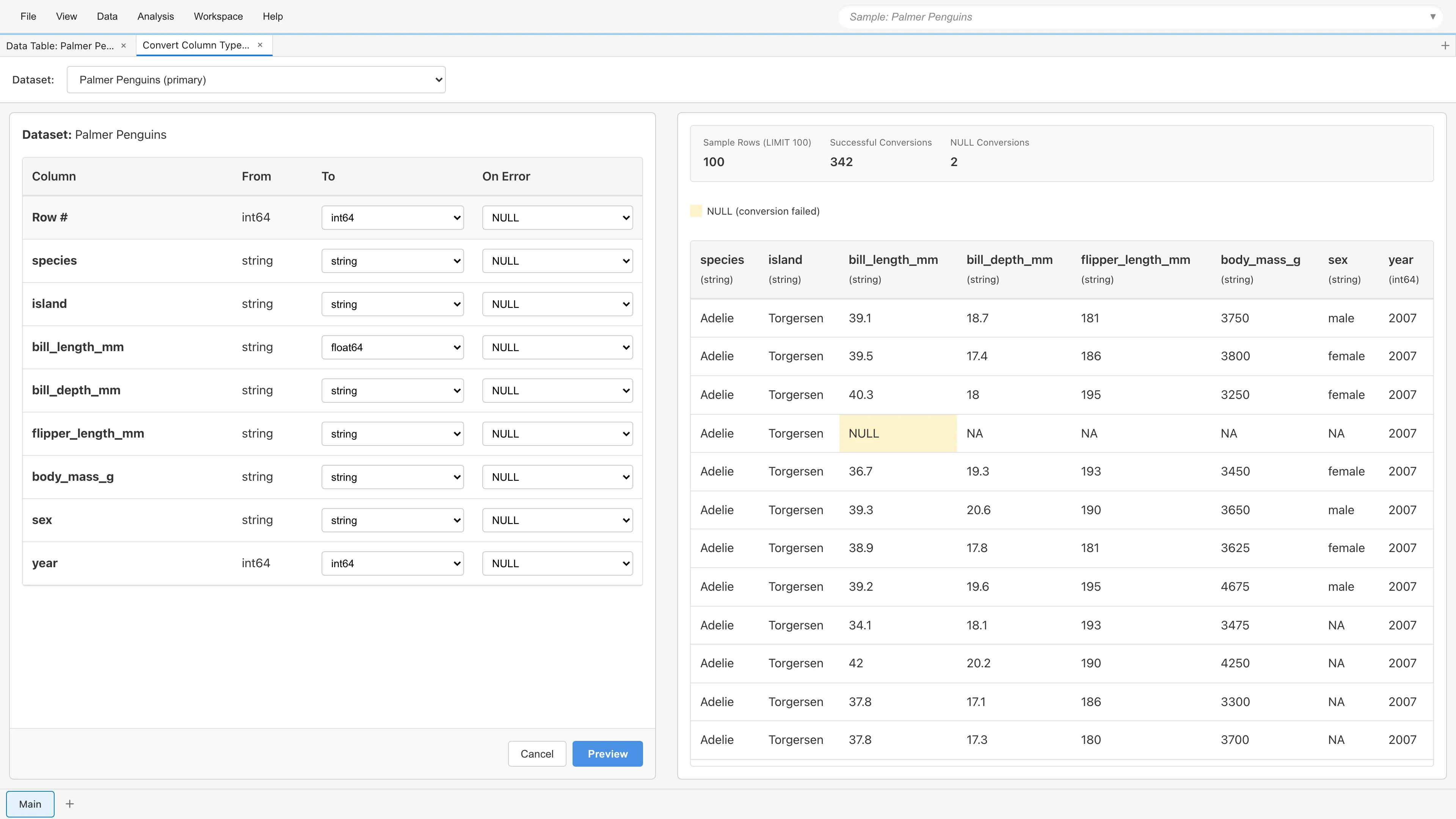
Click Auto-detect types to have MIDAS examine the values in each string column and fill the To column with a proposed type. Review the proposals, adjust them if needed, and continue to Preview. Columns that are not string are left unchanged.
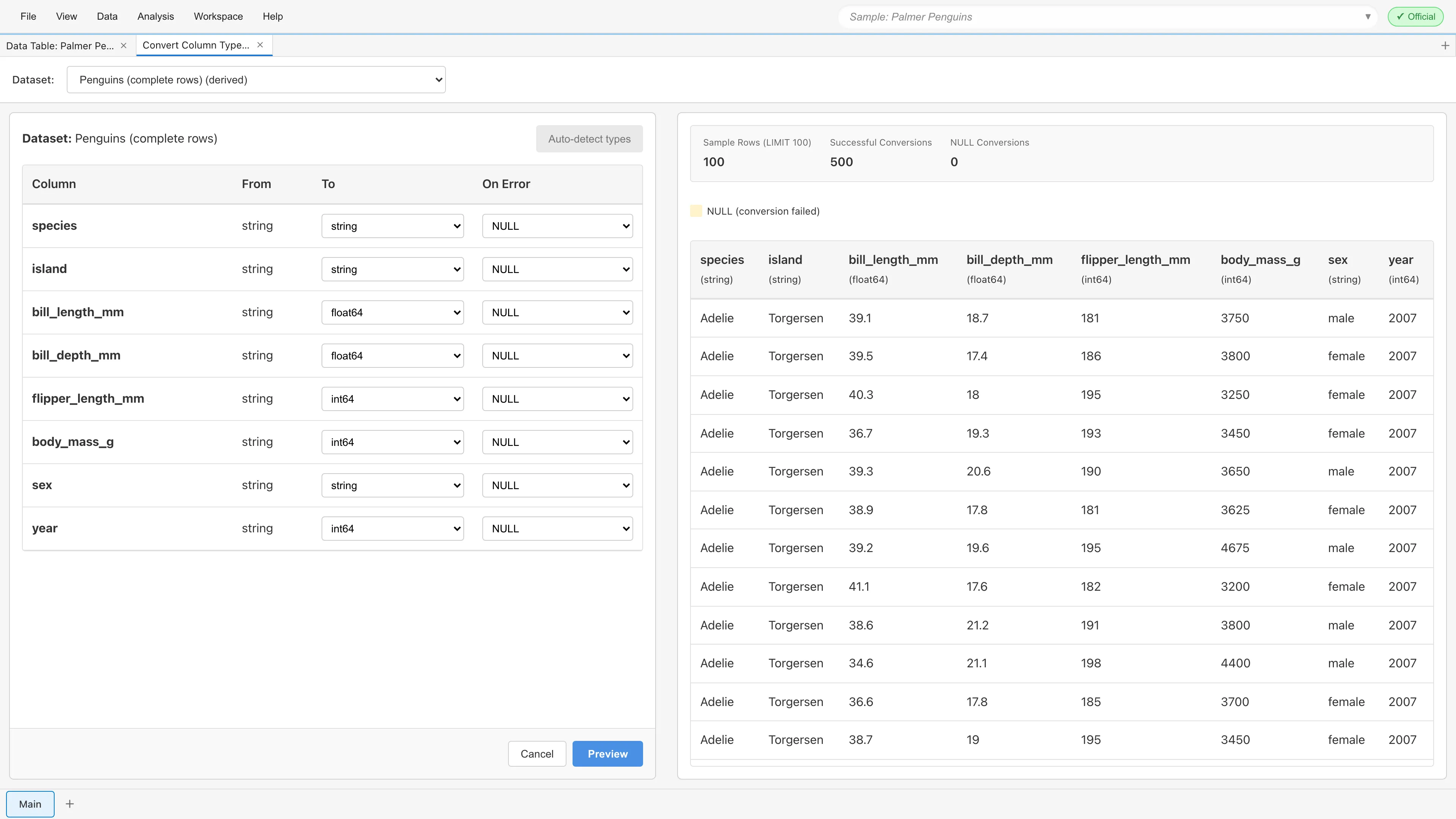
A type is proposed only when every value in the column, excluding missing values, can be interpreted as that type. Strings like NA count as values, not as missing, so columns containing them are not classified and stay string. To convert such columns, select the type manually and choose how to handle unconvertible values in On Error.
Safeguards prevent destructive conversions. Number-like strings with leading zeros, such as postal codes, stay string because converting them would drop the leading zeros. Columns containing integers beyond ±2^53 are not proposed as numeric because the conversion would lose the lower digits. Columns containing only 0 and 1 are detected as int64, not boolean. Columns that parse as dates are detected as datetime if any value has a time other than 00:00:00, and date if all values are at 00:00:00. A value with an explicitly written midnight time, such as 2025-01-15 00:00:00, counts toward date.
Data Types
The data types available in MIDAS are:
| Data Type | Description | Examples |
|---|---|---|
boolean | Boolean value | true, false |
int64 | Integer | 42, -100 |
float64 | Decimal | 3.14, -0.5 |
date | Date | 2024-01-15 |
datetime | Date and time | 2024-01-15 10:30:00 |
string | Text | "Hello", "Tokyo" |
<Enum name> | Project-defined category set (created via The Manage Enums Tab) | species_enum, etc. |
Enum types created via The Manage Enums Tab appear in the To dropdown by name (e.g., species_enum). Only string, int64, and Enum columns can be converted to an Enum type; for columns of other types, Enum names are not listed. See The Manage Enums Tab for instructions on converting columns to Enum type.
Which string notations convert to each type follows the same interpretation rules as type detection on loading and cell editing. See Data Types for the formats each type accepts. MIDAS strips leading and trailing whitespace before interpretation for conversion to every type, and a value that becomes empty after stripping is treated as a missing value (NULL), not as a conversion error. Converting an Enum column to a numeric, boolean, date, or datetime type interprets each level's value as a string under the same rules.
Error Handling (On Error)
Choose how to handle values that cannot be converted:
| Option | Description |
|---|---|
| NULL | Replace unconvertible values with NULL (missing) |
| Exclude row | Remove rows containing unconvertible values from the dataset |
| Fail | Stop processing and show an error if any value cannot be converted |
Example: String to Integer Conversion
If the original data contains values like "abc" that cannot be converted to numbers:
- NULL:
"abc"becomesNULL(missing value) - Exclude row: The entire row is removed from the dataset
- Fail: Conversion is aborted and an error message is displayed
For conversion to integer (int64), decimals like "1.5", number-like strings with leading zeros like "007", and integers beyond ±2^53 also count as unconvertible, in addition to non-numeric values like "abc". Values are never silently rounded or stripped of leading zeros.
Timezone for Datetime Conversion
When you select datetime in To for a string column, a timezone field (Timezone for values without a UTC offset) appears below the row. Typing part of a name filters the candidates (e.g., tokyo finds Asia/Tokyo). The candidates are the names in the timezone database bundled with MIDAS, which covers region names such as Asia/Tokyo and aliases such as US/Pacific. This field sets the timezone in which values without a timezone offset are interpreted. The default is UTC: a value like 2025-01-15 14:30:00 is interpreted as 14:30 UTC. With Asia/Tokyo, the same value is interpreted as 14:30 Japan Standard Time and stored as 05:30 UTC. Use this setting when a CSV recorded in local time cannot be re-exported in a format with offsets.
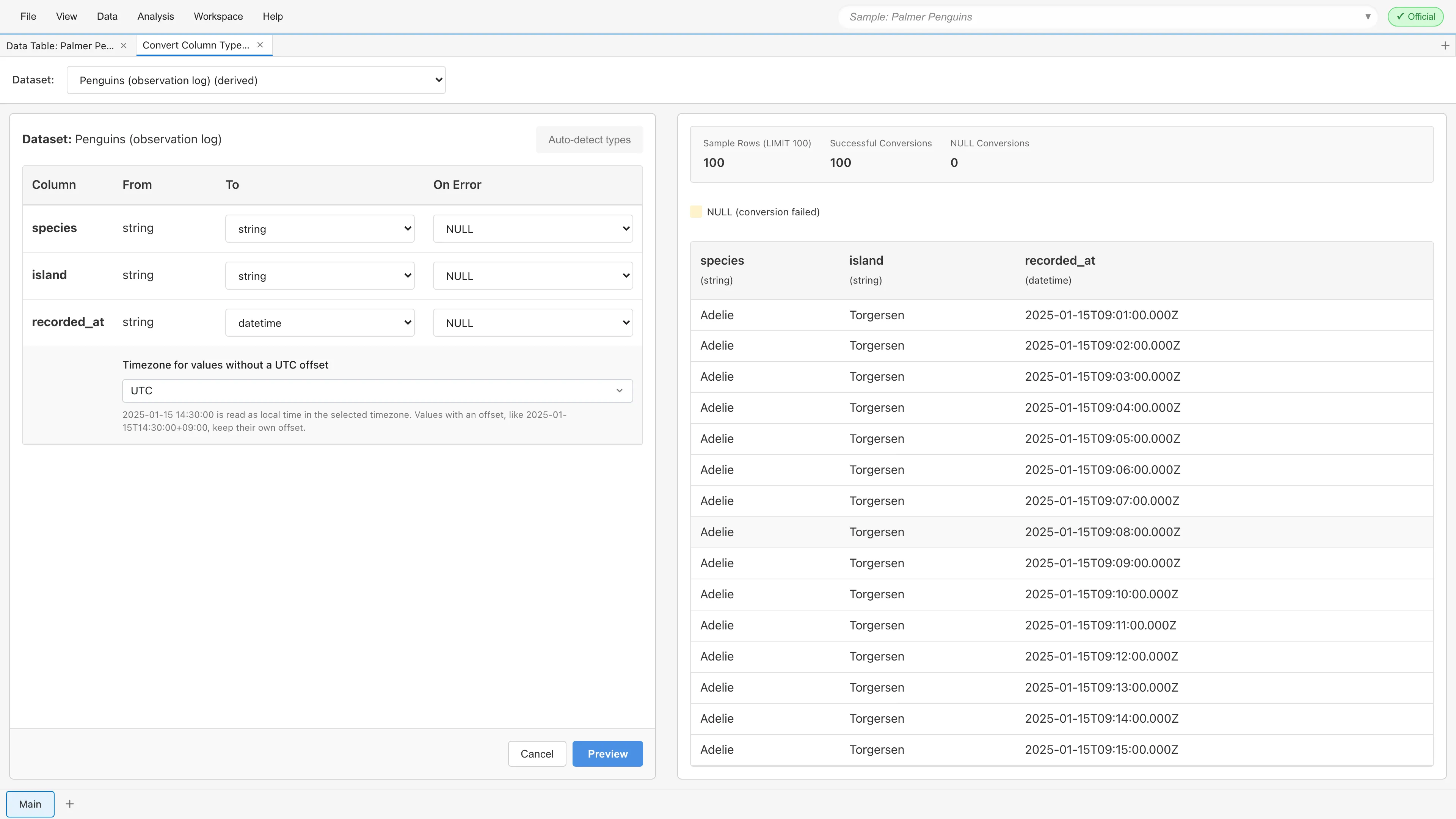
The Timezone setting applies only to values without an offset. A value with an offset, such as 2025-01-15T14:30:00+09:00, is interpreted with its own offset regardless of the setting. When a column mixes both kinds of values, this rule applies per value. A date-only value is interpreted as 00:00:00 in the specified timezone.1
The specified timezone is stored in the conversion settings as a fixed value. Opening the project on a device with a different browser timezone and recomputing does not change the result. See Datetime Data and Timezones for how datetime values are stored and displayed.
Preview Feature
Click the Preview button to review conversion results before applying. The preview screen displays the converted data, and in Exclude row mode, rows with conversion errors are highlighted. If everything looks correct, click Apply to execute. If there are issues, click Back to return to settings and make adjustments.
Executing Conversion
When you click Apply, a dialog appears to enter a new dataset name. Enter a name and click OK to create the conversion result as a new dataset.
The original dataset is not modified. Conversion results are always saved as a new Derived Dataset.
Editing a Saved Conversion
Existing converted datasets can be edited. Right-click the dataset in the Project Lineage tab, or select Edit Operation... from the dataset's menu button (⋮) in Project Overview, and Convert Column Types opens in edit mode with the source dataset and conversion settings restored.
In edit mode, if other datasets, models, or reports depend on this dataset, a warning shows the kinds and counts of affected items. Changing the source dataset resets the conversion settings, so configure them again for the new source columns. If a saved conversion targets an Enum type on a column whose type cannot be converted to an Enum type, edit mode opens with that column's conversion removed and shows the removed column names in a warning. Click Apply and confirm, and the same dataset is recomputed with the new settings. The dataset name does not change. Derived datasets that depend on this dataset are recomputed the next time their data is needed, and dependent models are re-estimated automatically.
If the transformation is changed from another path such as another edit tab or the Agent API between the time this tab opens and the time you click Apply, MIDAS stops the save and shows a dialog. This keeps the earlier change from being lost without warning. The dialog shows the transformation as it was when the tab opened next to the version changed elsewhere since then. Choose Overwrite with This Tab's Edits to save the edits in this tab over the version changed elsewhere. Choose Keep Editing to return to the edit tab without saving; the edits stay in place, and saving again shows the same dialog.
See also
- Data Table - Viewing and manipulating data
- Data Preparation and Import - About data types and measurement scales
- The SQL Query Editor Tab - Advanced data transformation with SQL
Footnotes
-
A time that does not exist due to a daylight saving transition and a time that occurs twice are both interpreted with the standard time offset. For example, in America/New_York, the nonexistent time
2025-03-09 02:30:00becomes 07:30 UTC, and the repeated time2025-11-02 01:30:00becomes 06:30 UTC. ↩
Also available as a Markdown file.