The GLMM Tab
The GLMM tab fits random intercept models , for data with group structure.
For example, with student test scores collected from multiple schools, you can estimate fixed effects such as study hours while accounting for school-level differences through the random intercept .
This model extends GLM by adding random effects, and is also known as a multilevel model. When test scores are correlated within schools and study hours vary across schools, ignoring the school differences with GLM leads to an underestimated standard error for the study-hours coefficient and a confidence interval that is narrower than it should be.
See GLMM Fundamentals for the mathematical background.
Basic Usage
Opening GLMM
Select Analysis > Mixed Effects Model (GLMM)... from the menu bar.
Setting Up the Analysis
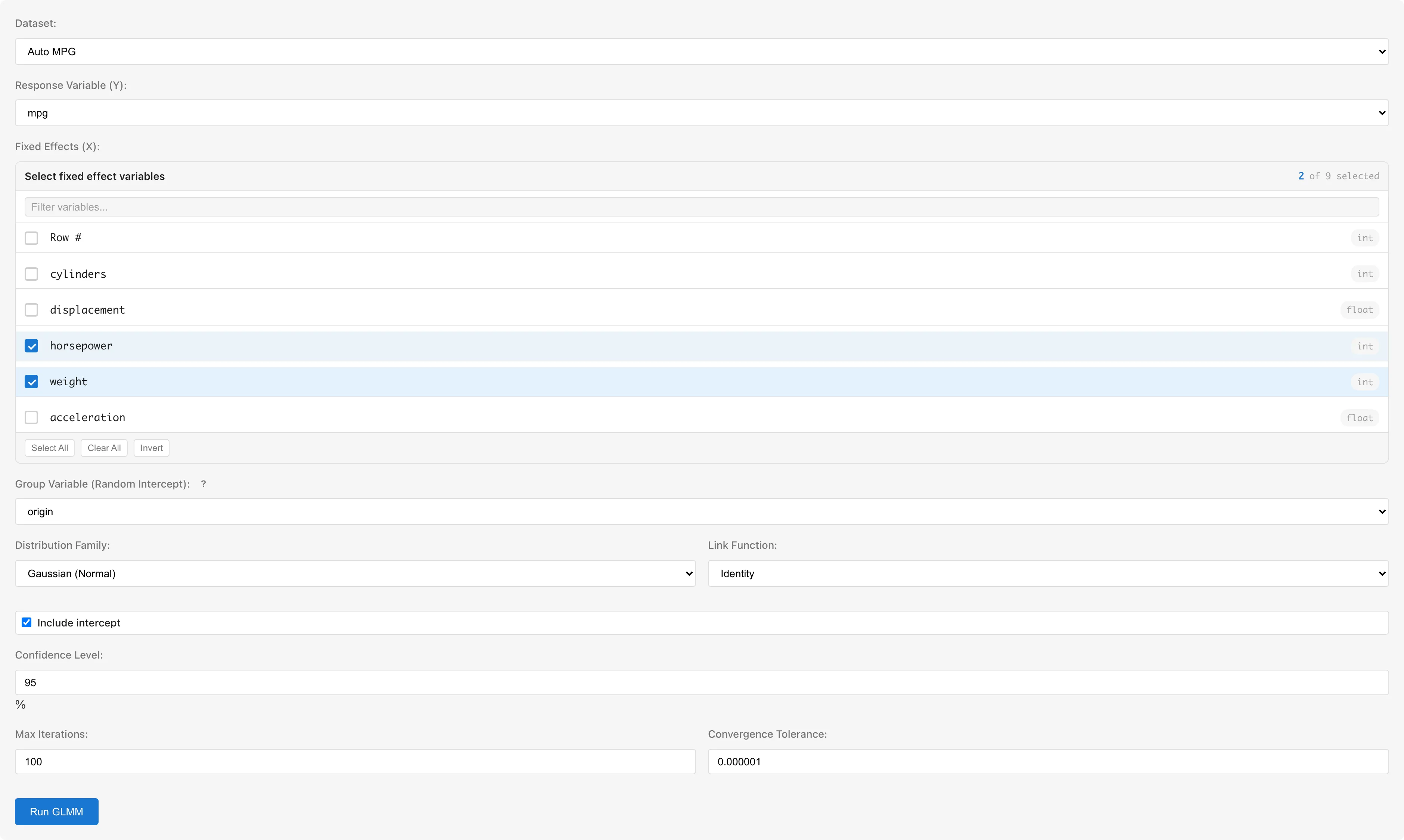
Dataset selects the dataset to analyze. GLMM expects one row per observation, with a column identifying the group. If repeated measurements are spread across columns, convert them with Wide to Long in the Reshape tab.
Response Variable (Y) selects the response variable. Only numeric columns (interval/ratio scale) are available. For the Binomial family, use a column with 0/1 values. A boolean column is inferred as nominal scale by default and cannot be selected; change its scale to interval in the Data Table to make it selectable, and its values are treated as true=1, false=0.
Fixed Effects (X) selects predictor variables for fixed effects; select at least one. Only numeric columns are selectable. To use categorical variables, convert them with Dummy Coding first. The conversion creates a new derived dataset, so switch Dataset to that dataset afterwards.
Group Variable (Random Intercept) selects the grouping variable for random intercepts. Categorical (nominal/ordinal) or string columns are available. Columns that record groups as numbers, such as line numbers or school IDs, are inferred as interval scale and do not appear as candidates; change their scale to nominal in the Data Table to make them selectable.
Distribution Family selects the distribution family:
| Family | Default Link | Available Links | Use Case |
|---|---|---|---|
| Gaussian (Normal) | Identity | Identity, Log | Continuous values |
| Binomial (Logistic) | Logit | Logit, Probit | Binary data |
| Poisson (Count) | Log | Log, Identity | Count data |
| Gamma | Inverse | Inverse, Log, Identity | Positive continuous |
Link Function selects the link function. Defaults to the canonical link for the selected family. Available options depend on the selected family (see table above).
| Link Function | Formula | Description |
|---|---|---|
| Identity | No transformation. Canonical link for Gaussian | |
| Logit | Log-odds transformation. Canonical link for Binomial | |
| Log | Log transformation. Canonical link for Poisson. Ensures | |
| Inverse | Reciprocal transformation. Canonical link for Gamma | |
| Probit | Inverse CDF of the standard normal distribution. Corresponds to a latent normal variable model |
See GLM Fundamentals: Choosing a Link Function for the mathematical properties of canonical links.
Include intercept toggles the intercept term (default: on).
Confidence Level sets the confidence level for confidence intervals (default: 95%, range: 50--99.99%). This is reflected in the Lower N% / Upper N% columns of the Fixed Effects table. The Model Detail tab opened after saving has the same input pre-filled with the saved value, and you can change it there to recompute the CI without modifying the saved value.
Max Iterations sets the maximum number of optimization iterations (default: 100).
Convergence Tolerance sets the convergence threshold (default: 1e-6).
Running the Analysis
Click Run GLMM. The estimation algorithm differs by family (see details). While the analysis runs, a progress bar and the estimation stage appear below the form.
Changing the variable selection or the model settings after a run makes the displayed results no longer belong to the current settings. MIDAS removes those results from the view and shows a message asking you to run the analysis again. Restoring the previous settings brings the results back. Changing Dataset also resets the variable selection, so the results are discarded instead. Changing Confidence Level keeps the results, because that setting only recomputes the intervals from the estimated coefficients.
The displayed results also stop belonging to the current data when the dataset used for the fit changes after a run. Reloading the dataset, editing cells, and changing an upstream dataset all count as such changes. MIDAS removes the results from the view and shows a message saying the dataset was modified. In this case there is no setting to restore, so run the analysis again to get results for the current data.
Understanding Results
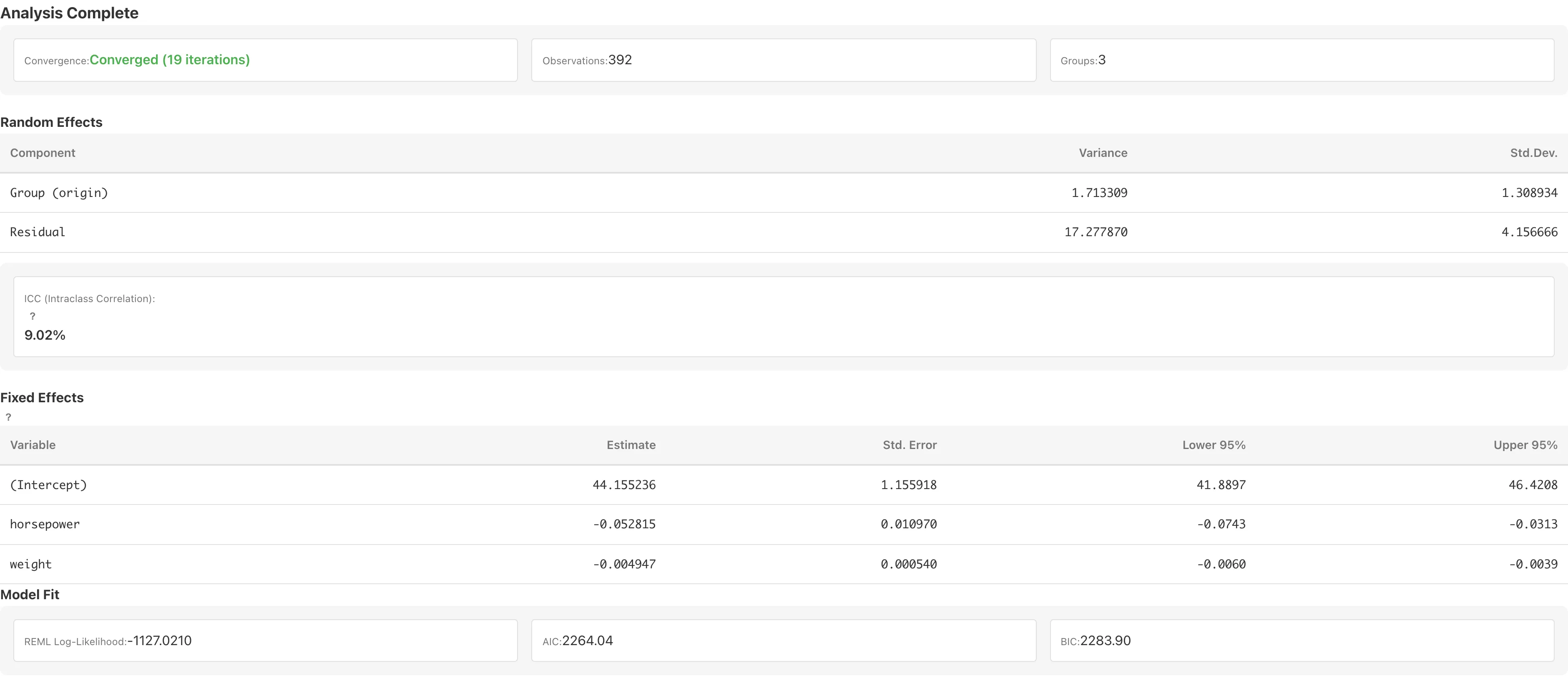
The display format of each numeric column in the Random Effects, Fixed Effects, and BLUP tables can be changed per column. The default is fixed decimal notation, except that the Rank column in the BLUP table shows the rank value as is. Right-clicking a column header opens presets such as fixed decimals and significant digits. The chosen format is stored in the tab and persists when the model is rerun.
Random Effects
Displays variance components for random effects.
| Column | Description |
|---|---|
| Component | Name of the variance component. Group (variable name) for the group variable variance, Residual for the Gaussian residual variance, Dispersion (φ) for the Gamma dispersion parameter |
| Variance | Estimate: for the group variable, for Residual, for Dispersion (φ) |
| Std.Dev. | Square root of Variance. The Dispersion (φ) row shows "-", which marks a value that cannot be computed, because its square root is not a standard deviation |
For Poisson and Binomial families, neither the Residual row nor the Dispersion (φ) row is shown because the dispersion parameter is fixed at .
How the variance components are estimated depends on the combination of family and link. For Gaussian + identity, the variance components are REML estimates. For all other combinations, every displayed variance component is a maximum-likelihood estimate that maximizes the Laplace-approximated marginal likelihood. The value of the Residual row or the Dispersion (φ) row is then the estimate of the family's dispersion parameter . Maximum-likelihood estimates understate the variance components when there are few groups (see the REML section). See GLMM Fundamentals for the details of the estimation.
What the dispersion parameter represents is determined by the distribution family, not by the link function, because the relation between and the conditional variance of the response is a property of the distribution family. For Gaussian, , so is the residual variance itself. For Gamma, , so is not a variance and its square root is not a standard deviation. This is why MIDAS labels the Gamma row Dispersion (φ) instead of Residual and shows "-" for its Std.Dev. The link function affects the estimate of and the diagnostic residuals (deviance and Pearson) through the fitted values computed from the linear predictor (see Saving and Diagnostics).
ICC (Intraclass Correlation Coefficient)
ICC represents the share of unexplained variance attributable to between-group differences (). MIDAS computes ICC only for the following family+link combinations, where has a theoretical basis:
| Family | Link | |
|---|---|---|
| Gaussian | identity | REML estimate |
| Binomial | logit | (threshold model) |
| Binomial | probit | (threshold model) |
For all other combinations — Poisson (all links), Gamma (all links), and Gaussian with the log link — no theoretically grounded residual variance exists, so N/A (ICC not defined) is shown instead of an ICC value (see GLMM Fundamentals for details). For these combinations, the magnitude of between-group variation can still be assessed from the Variance in the Random Effects table ( on the link scale) and from BLUP.
Even for combinations where ICC is defined, N/A (degenerate fit) is shown when the variance component estimation breaks down and ICC cannot be computed.
The interpretation of ICC depends on the nature of the data and the research objective, and group size should also be considered (see When to Use GLMM vs GLM).
For Binomial models, ICC is computed on the latent (link) scale, not the probability scale. It does not equal the correlation of the observed binary responses.
Fixed Effects
Coefficient table for fixed effects.
| Column | Description |
|---|---|
| Variable | Variable name |
| Estimate | Regression coefficient |
| Std. Error | Standard error. For Gaussian + identity, the Kenward-Roger method corrects the understatement caused by plugging in estimated variance components. When the correction cannot be computed numerically, a warning is shown and the unadjusted value is used. For all other combinations, an approximation based on the working weight matrix at the estimates |
| df | Per-coefficient degrees of freedom of the t-distribution used for the confidence interval. Shown only for Gaussian + identity when the Kenward-Roger correction was computed. Coefficients for which it cannot be computed show - |
| Lower N% / Upper N% | Wald-based confidence interval bounds, where N is the selected confidence level |
When the link function is logit or log, the following columns are added:
| Column | Description |
|---|---|
| OR / IRR / exp(Est.) | Exponentiated estimate . Displayed as odds ratio (OR) for logit link, incidence rate ratio (IRR) for log link with Poisson, and exp(Est.) for log link with other families |
| exp(Lower N%) / exp(Upper N%) | Exponentiated confidence interval bounds |
Coefficients are interpreted on the link function scale, as in GLM. See GLM coefficient interpretation for details.
The reference distribution of the confidence intervals depends on the family and link combination. For Gaussian + identity, MIDAS uses a t-distribution with per-coefficient degrees of freedom from the Kenward-Roger method, so the interval width reflects the uncertainty from estimating the variance components. Coefficients with small degrees of freedom are estimated from little information, and their intervals are wider accordingly. When the variance component structure is degenerate and the correction cannot be computed, MIDAS shows a warning and falls back to the unadjusted standard errors and the standard normal distribution. All other combinations use the standard normal distribution, whose intervals can be too narrow when the number of groups is small. See GLMM Fundamentals: Fixed Effect Inference for details.
The fixed effects coefficients table can be saved as a dataset using the Save as Dataset button for export to CSV. Using Add to Report also adds the BLUP table at the same time. Both require a saved model; if the model is not yet saved, the dialog asks for a model name and saves the model as part of the same action.
Model Fit
| Metric | Description |
|---|---|
| REML Log-Likelihood / Log-Likelihood (Laplace) | Log-likelihood. REML for Gaussian + identity; the Laplace-approximated marginal log-likelihood for all other combinations |
| AIC | , where is the total number of fixed-effect parameters and variance components |
| BIC | , where is the number of observations |
Model comparison based on AIC and BIC has limitations (see GLMM Fundamentals: AIC/BIC Limitations). REML-based AIC (Gaussian + identity) can only compare models with identical fixed-effect structure. Models with different families or links cannot be compared by AIC, BIC, or log-likelihood, because the log-likelihood basis (REML vs. Laplace) and scale differ.
BLUP (Random Effect Predictions)

Displays the BLUP (Best Linear Unbiased Predictor) of the random intercept for each group.
| Column | Description |
|---|---|
| Group | Group variable value |
| Conditional Mode | Predicted value of the random effect . Smaller groups are shrunk more toward the overall mean (0) (shrinkage details) |
| Std. Error | Standard error of the prediction. The square root of the conditional variance; larger for smaller groups |
| Rank | Rank of Conditional Mode in descending order |
The defining property of the BLUP — the smallest mean squared prediction error among linear unbiased predictors — holds only for Gaussian + identity. For all other combinations, the predicted value is the mode (the point of highest density) of the distribution of conditional on the observed data — the conditional mode — which is the quantity shown in the Conditional Mode column (see GLMM Fundamentals: Estimation and Prediction).
For combinations other than Gaussian + identity, the Std. Error is based on a normal approximation around the conditional mode, so an interval of the form (conditional mode) ± z × SE is not guaranteed to be an accurate prediction interval.
The BLUP table can be saved as a dataset using the Save as Dataset button for export to CSV. Saving the BLUP dataset requires a saved model; if the model is not yet saved, the dialog also asks for a model name and saves the model together with the dataset. To add it to a report, use the Add to Report button in the Fixed Effects section.
Saving and Diagnostics
Enter a model name in Model Name and click Save Model to save the model to the project. A diagnostic derived dataset is automatically created on save.
| Column | Description |
|---|---|
fitted_values | Predicted values (fixed + random effects) |
deviance_residuals | Deviance residuals |
pearson_residuals | Pearson residuals |
group_random_effect | Group random intercept (BLUP) |
For Gaussian + identity, the deviance and Pearson residuals both equal the raw residual , so deviance_residuals and pearson_residuals hold the same values.
After saving, View Model Details and View Diagnostics buttons become available. Model Detail displays the fixed effects coefficient table and a BLUP table (per-group random intercept estimates). The BLUP table shows up to 50 rows by default; when there are more groups, click Show all N rows (N is the total number of groups) to expand the full list. Use the Add to Report button to add both the coefficients table and the BLUP table to a report. When the fit raised warnings, Model Detail and the report both show the same warnings.
Notes
Current Limitations
The current GLMM implementation supports random intercept models only. Random slopes (models where a predictor's effect varies by group) and crossed random effects (models where observations belong to multiple group variables) are not supported (see GLMM Fundamentals).
The GLM tab offers the Negative Binomial family, but GLMM does not.
When to Use GLMM vs GLM
When ICC is small, ignoring group structure and using GLM produces nearly identical results. The impact depends not only on ICC but also on group size; the design effect provides a rough guide (see GLMM Fundamentals).
When ICC is large, GLM violates the independence assumption between observations and distorts the standard errors of the coefficients. The size of the distortion depends on the predictor: the more a predictor's variation lies between groups (such as a school-level tuition fee, which takes the same value within each group), the more strongly its standard error is underestimated, while predictors that vary mainly within groups are less affected. GLMM avoids this problem by explicitly modeling within-group correlation.
When you want to compare a small number of specific groups and estimate their effects directly, another option is to convert the groups to dummy variables with Dummy Coding and treat them as fixed effects in GLM (see GLMM Fundamentals).
Automatic Exclusion of Missing Values
Rows containing missing values, non-numeric values, or infinity are automatically excluded. The Observations value in the results is the number of observations after exclusion. This is listwise deletion. See Missing Data Mechanisms for conditions under which it yields valid estimates.
Convergence Issues
If the model fails to converge, try the following:
- Increase Max Iterations (for example, from 100 to 500)
- Relax Convergence Tolerance (for example, from 1e-6 to 1e-4)
- Standardize predictors whose scales differ greatly
Predictors are scaled internally, but extreme scale differences can make the GLM estimation that provides the initial values fail. Convergence problems are also more likely with very few groups (2 or 3), where variance component estimation becomes unstable.
Max Iterations limits only the golden-section iterations of the search over . The evaluations at points over the search range are fixed in number and do not count toward this limit. The iterations that compute the fixed effects and random effects for each candidate have their own limits. For each candidate value of the relative covariance parameter (see GLMM Fundamentals), MIDAS finds a starting point for the fixed effects and random effects with PIRLS (Penalized IRLS) iterations. Further iterations then optimize the fixed effects from there. When this optimization does not converge at a candidate in the interval that the search over finally narrows down to, the estimate cannot be determined and MIDAS aborts the fit with an error. When it does not converge at the finally adopted, the estimates are shown with a warning.
For Binomial data in which a predictor separates the response completely or nearly completely (separation), the fixed-effect estimates do not exist as finite values, so MIDAS aborts the fit with an error. The error message either reports that the fixed-effect optimization did not converge and points to possible separation, or reports that the equations for the fixed effects became numerically singular. Changing Max Iterations or Convergence Tolerance does not help; review the predictors that perfectly or nearly perfectly predict the response.
With the Inverse link for Gamma, the fit aborts with an error when the linear predictor cannot be kept positive. The Inverse link sets the mean to the reciprocal of the linear predictor, so a linear predictor of zero or below gives no positive mean. PIRLS shortens any update that would bring the linear predictor to zero or below, until the linear predictor stays positive. The error occurs when shortening the update does not bring the linear predictor back above zero, and when the GLM estimation that provides the initial values fails so that PIRLS starts from a linear predictor of zero. The Log link has no such restriction, because it gives a positive mean for any value of the linear predictor. The Log link, however, models the mean on a different scale from the Inverse link, so the coefficients also take a different meaning.
Singular Fit
A "Singular fit" warning appears when the estimate of the random effect variance reaches 0, the boundary of the parameter space. MIDAS reports a singular fit when the relative covariance parameter used in variance component optimization (see GLMM Fundamentals) satisfies .
The singular-fit check in MIDAS does not change with the units of the response. With the Inverse link for Gamma, multiplying the response by multiplies the linear predictor by , and with the Identity link it multiplies the linear predictor by , so also depends on the units of the response. For Gaussian + log, multiplying the response by only shifts the linear predictor by the constant . However, is multiplied by , so is multiplied by . For these combinations and for the Log link for Gamma, MIDAS divides the response by a positive value before estimation and runs the check on the resulting . The of the Gamma Log link does not depend on the units of the response, but with units that make the mean extremely large or small the numerical computation depends on them, so MIDAS divides the response in this case as well. is the mean of the response for Gamma and the mean of the absolute values of the response for Gaussian + log. With a Log link, dividing the response by lowers the log of the mean by . MIDAS adds the constant to the linear predictor in the fit, so the coefficients take the same values as in the model without the division. The estimates are converted back to the original units for display.
Singular fit occurs when the group variable explains very little variation in the response, or when the sample size or number of groups is too small to separate group-level variation from residual variation. It also occurs when the search over stops at a local maximum on the boundary and misses a maximum with a higher likelihood away from the boundary. GLMM Fundamentals explains when the search misses a maximum.
When singular fit occurs, ICC and variance component estimates should be interpreted with caution. A fixed-effects-only model (GLM) may be more appropriate.
See also
- GLM - Generalized linear models without random effects
- GLMM Fundamentals - Mathematical background of random effect models
Also available as a Markdown file.