Tutorial: Optimizing Injection Molding Conditions with Design of Experiments
This tutorial walks through designing an orthogonal array, entering experimental results, estimating factor effects, and checking interactions in the DoE Analysis tab, using an injection molding sample dataset.
Consider an injection molding line where product strength is falling short of the target, and three molding conditions are suspected: molding temperature (Temperature), molding pressure (Pressure), and cycle time (CycleTime). To estimate the effects of all three conditions on strength in a single experiment, you use design of experiments. For the ideas behind design of experiments and the full feature list of the DoE Analysis tab, see DoE Analysis Tab.
This tutorial assumes the basic operations covered in Getting Started.
Load the Data
Click Injection Molding in the Sample Data section of the launcher screen to load a dataset with 16 rows and 4 columns. You can also open it directly by URL without going through the launcher1.
| Column | Description |
|---|---|
Temperature | Molding temperature (High / Low) |
Pressure | Molding pressure (High / Low) |
CycleTime | Cycle time (Long / Short) |
Strength | Strength of the molded part (response variable) |
The dataset records 16 experimental runs: all 8 combinations of the three two-level factors, each run twice. See Sample Datasets for the origin of the data.
Design the Orthogonal Array
When you plan your own experiment, the wizard in the DoE Analysis tab generates a dataset for the experimental design. This section walks through the wizard.
Select Analysis > DoE Analysis... to open the DoE Analysis tab. Press the New Design... button in the tab to open the Design of Experiments Wizard.
Under Define Factors, enter a name and two level labels for each factor. The initial state shows two factors, Factor A and Factor B, with levels Low and High. Add Factor adds a factor.
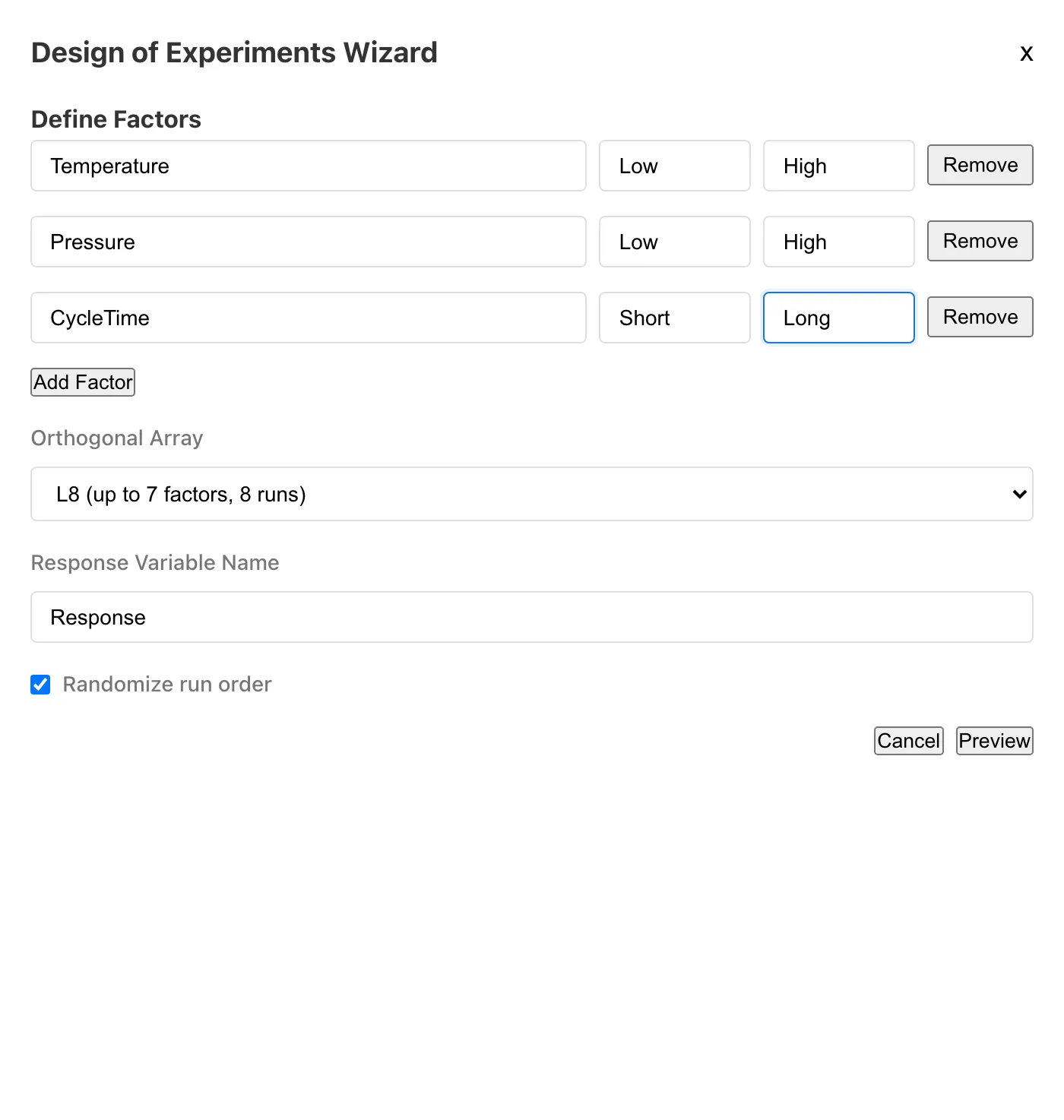
The items below the factors set the conditions for the generated design. Orthogonal Array selects the array from L4, L8, and L16. They use 4, 8, and 16 runs, and accommodate up to 3, 7, and 15 factors, respectively. Response Variable Name sets the name of the response column. Replications is the number of replicates per experimental condition; the number of generated rows is the array's run count × the number of replications. Randomize run order is enabled by default and shuffles the order of the generated rows.
Press Preview to inspect the table of conditions that will be generated. The preview shows the rows in unshuffled order, so when Randomize run order is enabled, the row order of the generated dataset differs from the preview. The response column is generated empty; you enter values after running the experiment.
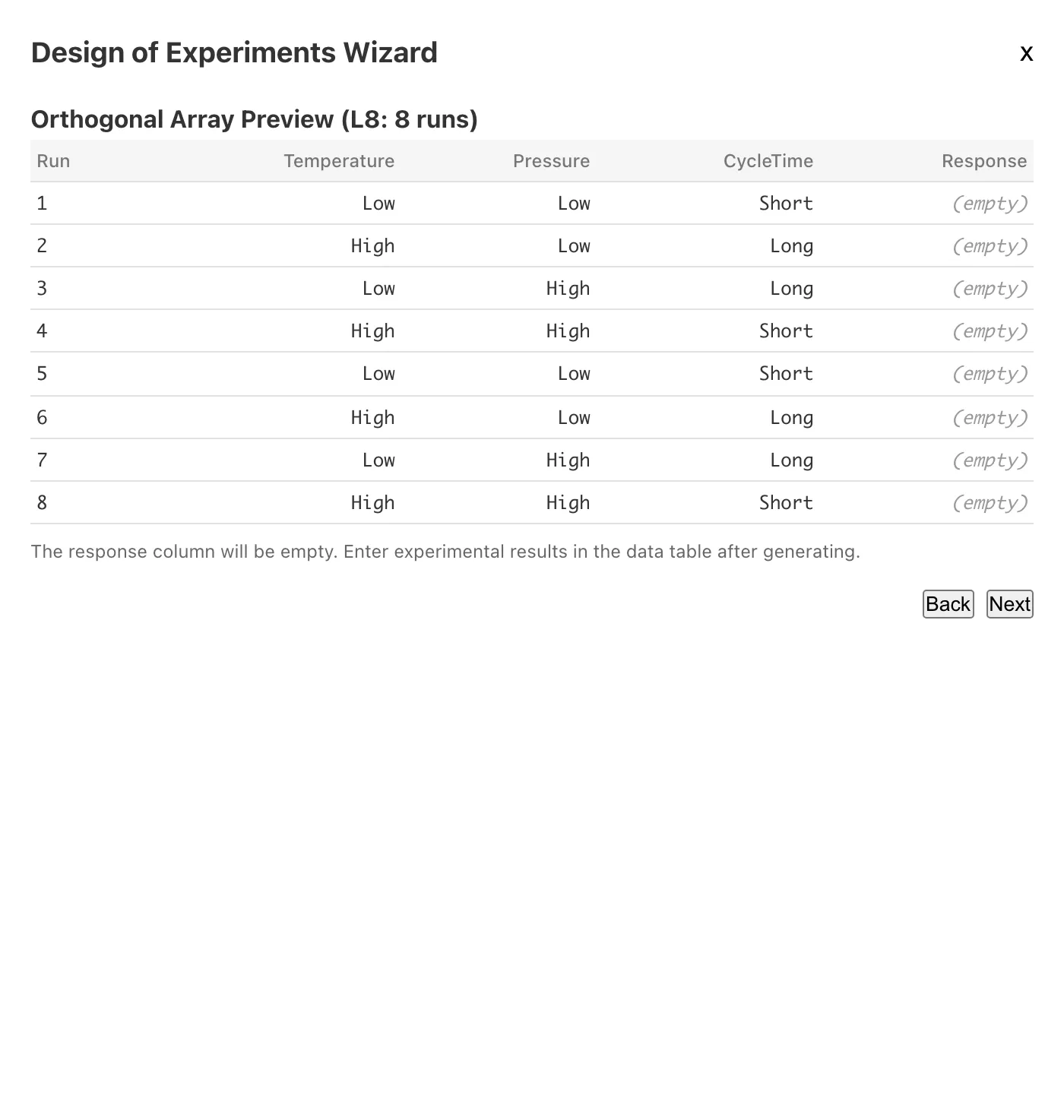
Press Next, choose a dataset name, and press Generate to add the experimental design to the project as a new dataset. With the settings shown in the screenshots (the three factors Temperature, Pressure, and CycleTime, L8, and 2 replications), the generated plan contains all 8 level combinations twice each, the same structure as the sample dataset analyzed in the following sections.
Enter the Results
After running the experiment, enter the results into the generated dataset in the Data Table tab. Open the dataset in the Data Table tab and select Edit Data from the menu to enter edit mode. Click a cell in the response column to enter a value, and press Done to save. See Data Table Tab for the details of edit mode.
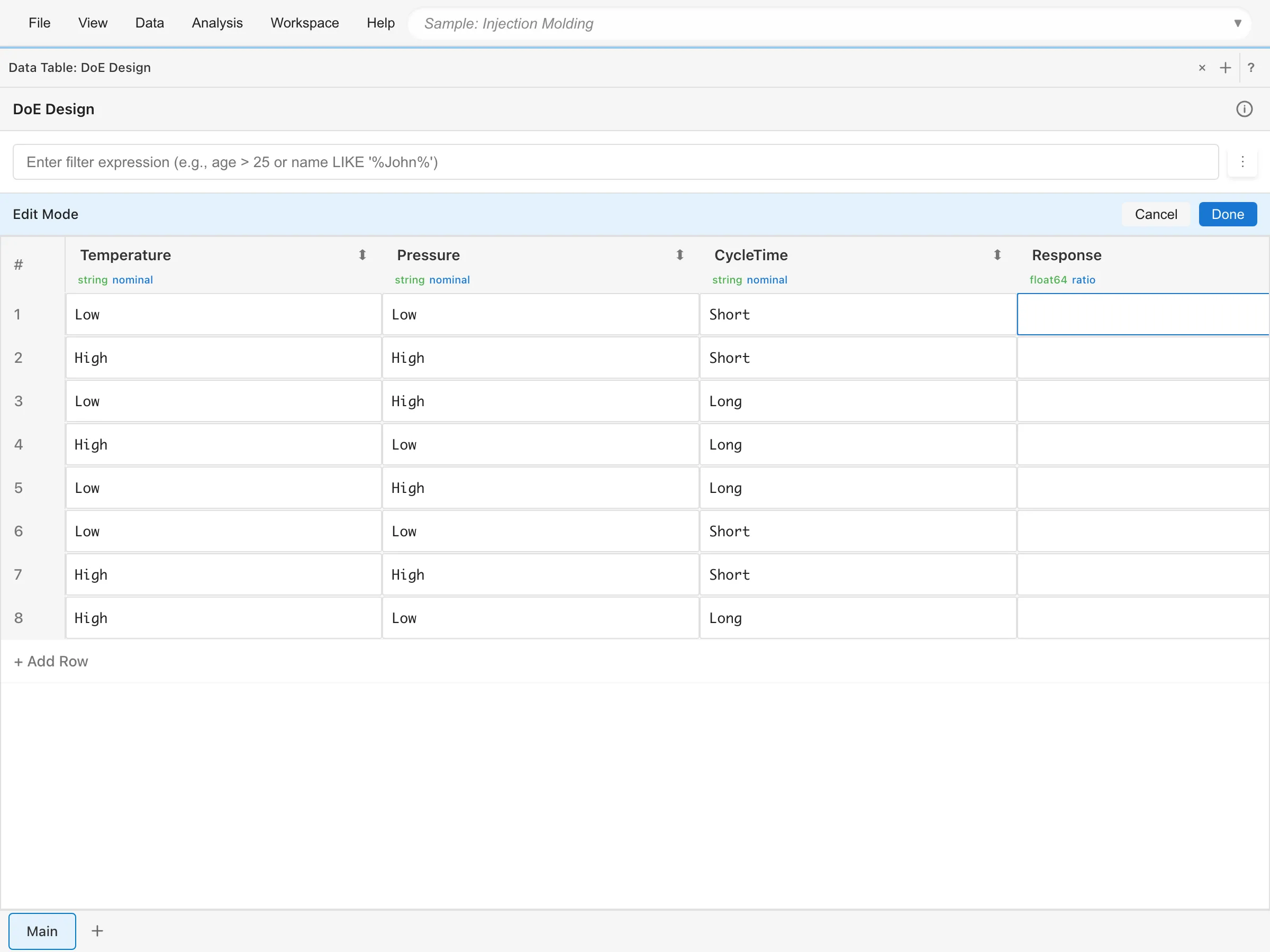
The rest of the analysis uses the Injection Molding dataset, which already has the results recorded.
Set Up and Run the Analysis
Return to the DoE Analysis tab and set up the analysis. Select Injection Molding under Dataset. Response Variable (Numeric) lists only numeric columns; select Strength. Factors (categorical) lists only categorical columns. Select All selects Temperature, Pressure, and CycleTime at once. Leave Model at its initial value, Main effects only.
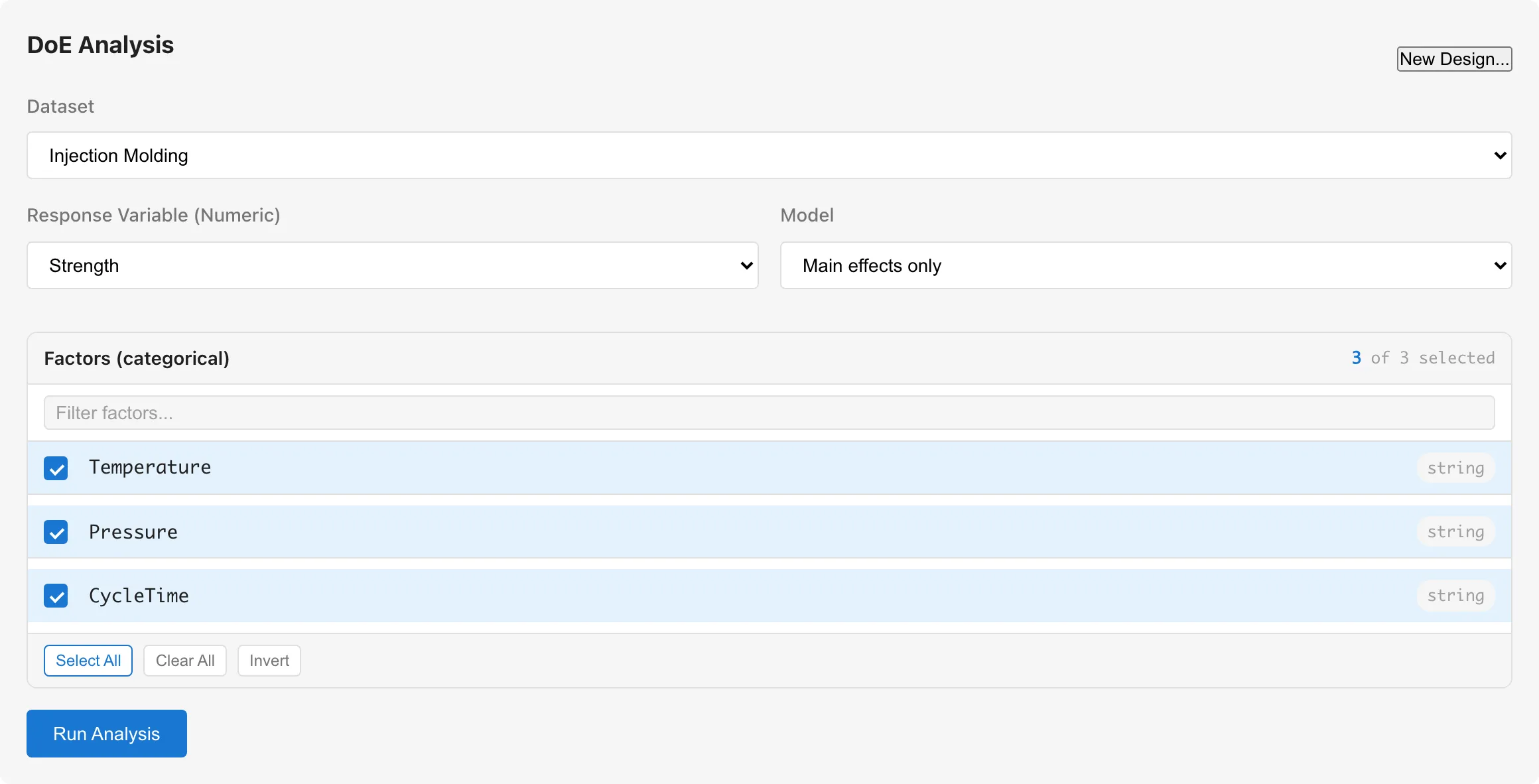
The Run Analysis button stays disabled until a response variable and at least two factors are selected. While it is disabled, hovering over the button shows the missing conditions in a tooltip. When you change a setting, pressing the same button again reruns the analysis.
The results appear in five subtabs: ANOVA Table, Effects, Main Effects, Interaction, and Diagnostics. Observations at the top of the results is the number of rows used in the analysis, 16 for this dataset.
Read the Variation in the ANOVA Table
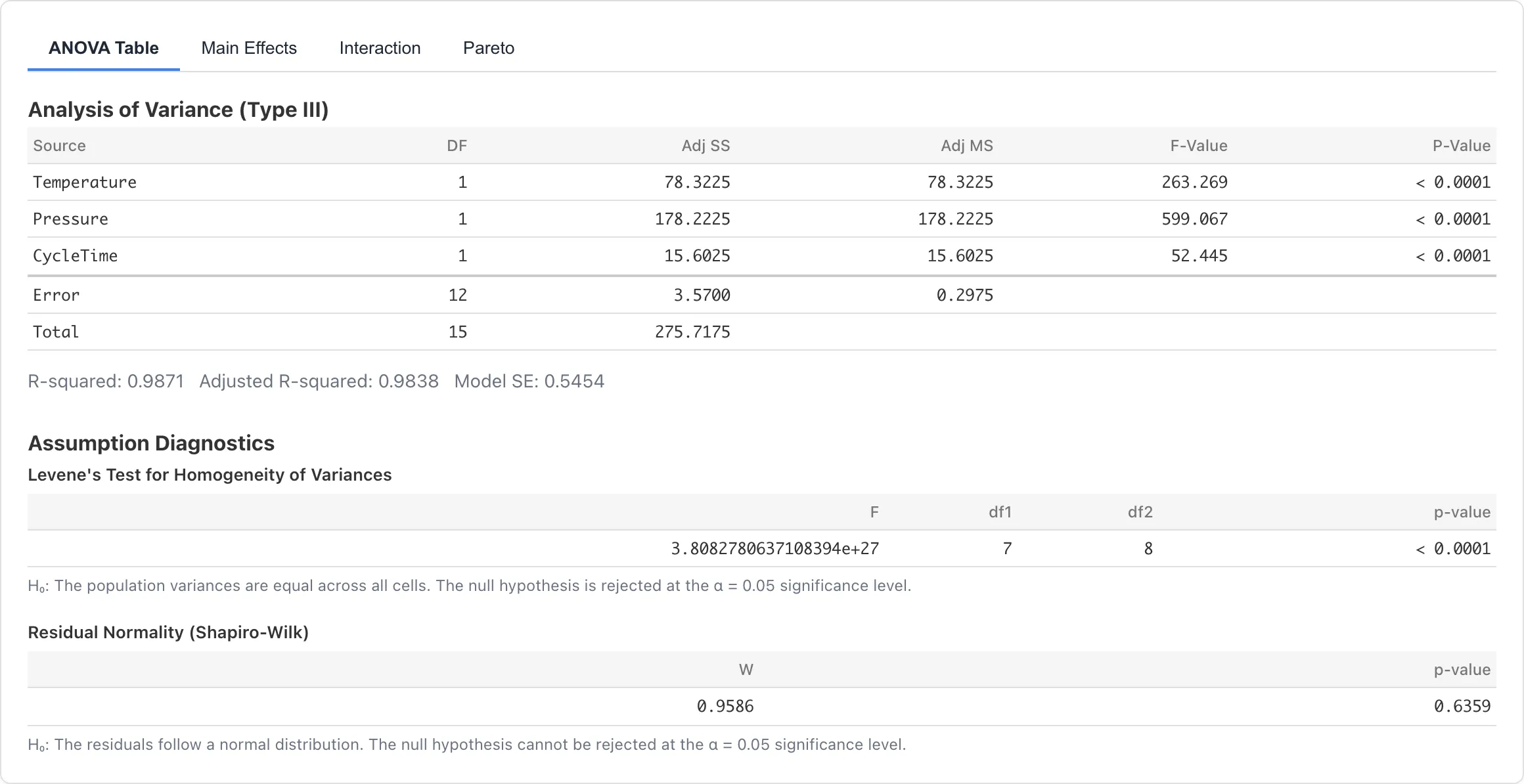
The ANOVA Table subtab shows the amount of variation associated with each factor and the error variation. The table has Source, DF, Adj SS, Adj MS, partial η², and partial ω² columns. MIDAS computes Type III sums of squares2.
In this dataset, the three factors explain most of the variation in the response. The Adj SS is largest for Pressure at 178.2225, followed by Temperature at 78.3225 and CycleTime at 15.6025. The Error row has DF 12 and Adj SS 3.5700, smaller than any factor's Adj SS. The effect sizes in partial ω² are 0.974 for Pressure, 0.943 for Temperature, and 0.763 for CycleTime.
Below the table, the model-level summaries show R-squared 0.9871, Adjusted R-squared 0.9838, and Model SE 0.5454. R-squared is the share of the Total row's Adj SS of 275.7175 that the model explains. Model SE is the square root of the Error row's Adj MS of 0.2975, in the same units as the response variable.
Read Factor Effects and Confidence Intervals
The Effects subtab shows the estimated effect of each factor with a 95% confidence interval. The table has Term, Effect, Std. Error, Lower 95%, and Upper 95% columns. For main effect rows, Effect is the estimated difference in mean response between the two levels, in the same units as the response variable. The direction of the difference appears in Term, as in Temperature (High − Low)3.
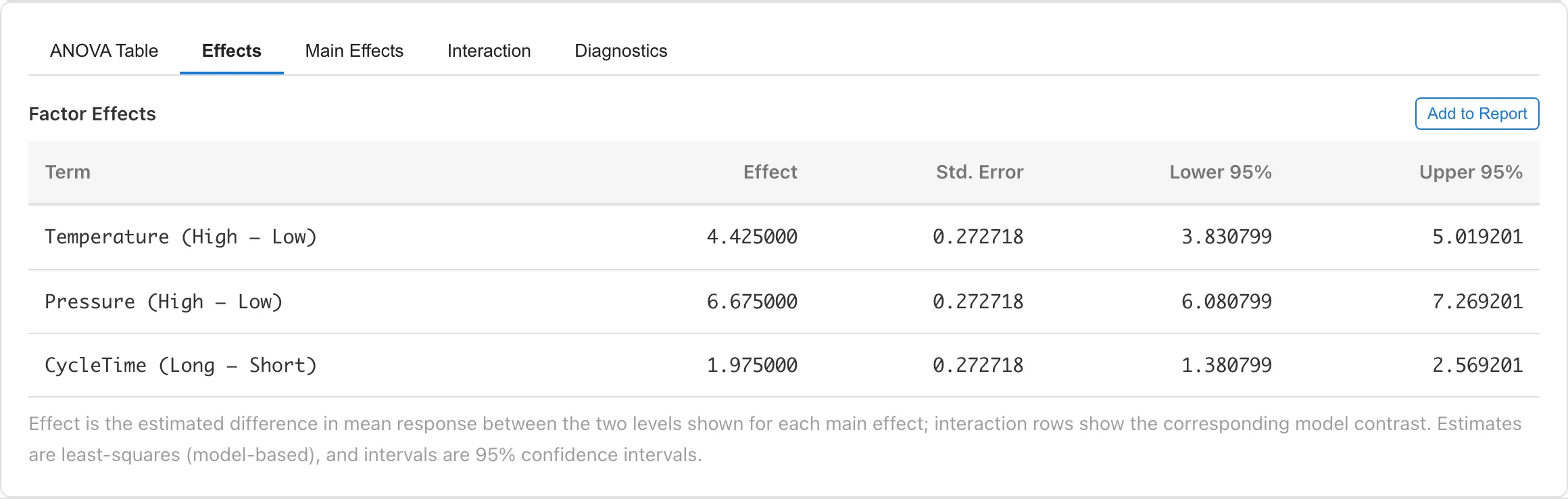
In this dataset, the effect of Pressure (High − Low) is 6.675 with a 95% confidence interval of about 6.08 to 7.27, Temperature (High − Low) is 4.425 with about 3.83 to 5.02, and CycleTime (Long − Short) is 1.975 with about 1.38 to 2.57. All three estimates are positive: the estimated mean strength is higher at the High levels of Temperature and Pressure and at the Long level of CycleTime. The estimates rank Pressure first, then Temperature, then CycleTime.
Read Level Means in the Main Effects Plot
The Main Effects subtab draws one panel per factor, marking the mean response at each level with a point and connecting the points with a line. The dashed line in each panel marks the grand mean of 38.29. Checking Show 95% confidence intervals adds error bars to the points4.
In this dataset, Pressure has the widest gap between levels. The level means are 40.50 at High and 36.07 at Low for Temperature, 41.63 at High and 34.95 at Low for Pressure, and 39.27 at Long and 37.30 at Short for CycleTime, the same order as the estimates in the Effects subtab.
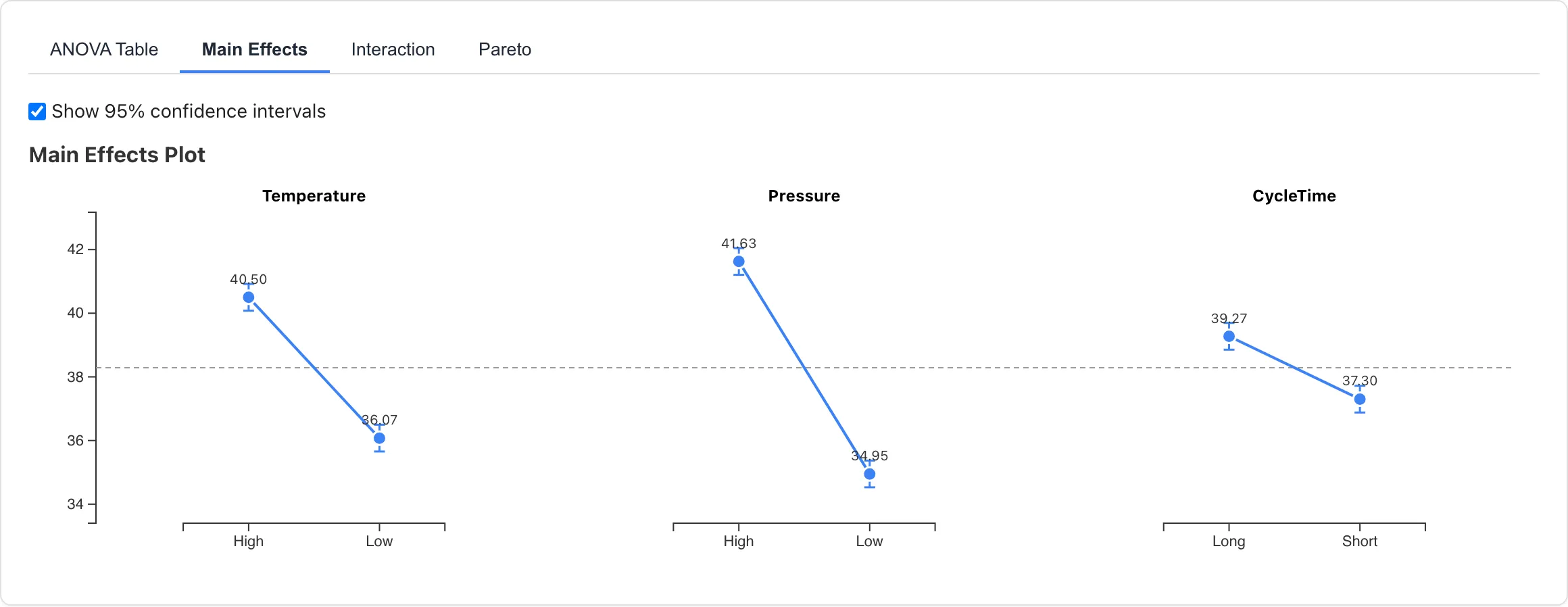
The error bars show the precision of each level mean. Whether two error bars overlap cannot be used to judge the difference between levels. Read the estimated difference and its uncertainty from the confidence intervals in the Effects subtab.
Clicking a point makes MIDAS select the matching rows in the source dataset.
Check Interactions
An interaction means that the effect of one factor changes with the level of another factor. The model so far includes only main effects, so to check for interactions, add interaction terms to the model. Change Model to Main effects + all 2-factor interactions and press Run Analysis again.
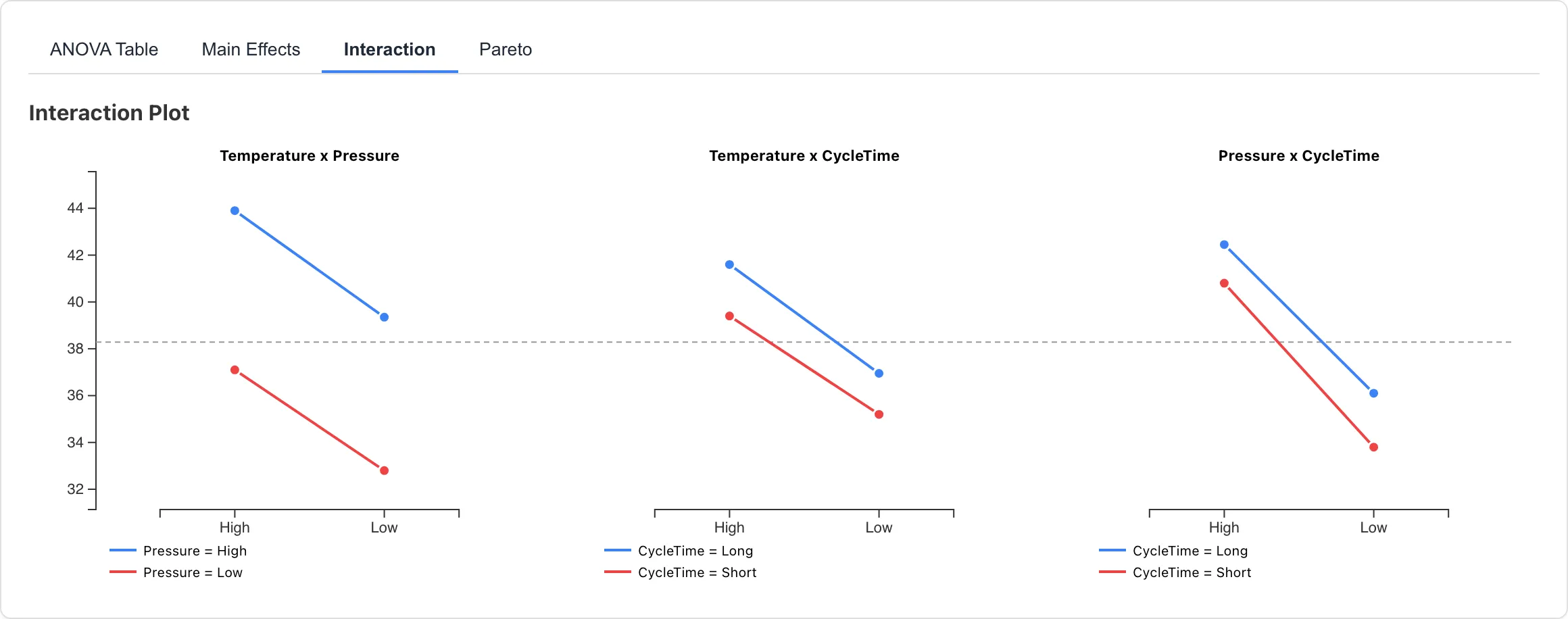
The Interaction subtab shows one panel per factor pair. The horizontal axis holds the levels of one factor, and the line color distinguishes the levels of the other. The closer the two lines are to parallel, the more the effect of one factor stays constant across the levels of the other. In this dataset, the two lines are nearly parallel in all three panels.
The size of the interactions can also be checked in the numbers of the Effects subtab. Adding interaction terms to the model adds interaction rows to the table. In an interaction row, Effect is not a difference between two levels but the estimate of the corresponding model contrast. Like a main effect, it equals twice a regression coefficient, so its size is on the same scale as the main effects. The estimates are 0.125 for Temperature × Pressure, 0.225 for Temperature × CycleTime, and −0.325 for Pressure × CycleTime, each smaller in absolute value than the 0.64 half-width of its 95% confidence interval. The main effect estimates stay at 6.675, 4.425, and 1.975, unchanged from before adding the interactions5.
Adding the interaction terms increases the number of model parameters, and the residual degrees of freedom drop from 12 to 9. Model SE changes from 0.5454 to 0.5659.
Summary
Among the three conditions suspected of causing the strength shortfall, Pressure has the largest estimated influence. The difference in mean strength between High and Low is 6.675, followed by Temperature at 4.425, with CycleTime comparatively small at 1.975.
Every interaction estimate has absolute value 0.325 or less, small even compared with the smallest main effect of 1.975. The interaction 95% confidence intervals do, however, extend to values around 0.97 in absolute terms, so an interaction about half the size of the CycleTime main effect cannot be ruled out by this data.
Related Pages
- DoE Analysis Tab -- feature list, the Diagnostics subtab, and adding results to reports
- ANOVA Tab -- analysis of variance and effect size measures
- Report -- organizing analysis results into a report
- Sample Datasets -- the list of other sample datasets
Footnotes
-
Column types and measurement scales are detected automatically on load. See Data Preparation and Import for how the detection works. ↩
-
See ANOVA Tab for the sum-of-squares types and the definitions of the effect size measures (partial η² and partial ω²). ↩
-
Effects are least-squares estimates. For the main-effects-only model, the confidence intervals come from the t distribution with 12 residual degrees of freedom. The residual of this model also contains variation from interactions not included in the model. ↩
-
The error bars are 95% confidence intervals for each level mean, covering mean ± t × . MSE is the model's residual mean square (the Adj MS of the Error row in the ANOVA table), is the number of observations at the level, and t is the 97.5% point of the t distribution with the residual degrees of freedom. ↩
-
The level combinations in this dataset form a balanced design, so adding terms to the model does not change the estimates of the other terms. ↩
Also available as a Markdown file.